Category Archives: Objects

Blog Move

This blog is in the process of moving in from it’s previous location at http://www.engr.uky.edu/~pseber0/ to it’s new home at pappp.net on bluehost. This current page will no doubt be repeatedly created and destroyed in the process, as I try to explain to the terrible migration tool about internal linking, resources, categories, and a variety of other things it is doing it’s best to lose or mangle. Things should be up and running in a couple of days, when the links will be updated, and the relocation notice will go up at the old location. This post also has a full set of categories, to force updates.

Posted in Announcements, Computers, DIY, Entertainment, FoodBlogging, General, Meta, Music, Navel Gazing, Objects, OldBlog, School | Leave a comment

Pionier Button Hacking: Step 2

It took over a year for me to get back to it, but I finally sat down and made some progress on hacking the Buttons Pionier was giving away at SC09.

When I last posted about it, I had drawn out all the USB identification information, as well as disassembled one, identified all the hardware components, and tracked down data sheets for the important bits.

Now that I have a Bus Pirate, I decided to dump the 24c64 EEPROM. A 24c64-type EEPROM speaks standard I2C, with the addition of three dedicated address pins (for banking chips), and a hardware write protect pin.

My first attempt was a little troublesome, because attaching the chip in-place was (as is often the case) powering the whole board, leaving two I2C bus masters, and confusing the situation.

The following is basically a reference for communicating with 24c32/64 EEPROMs.

To remedy the problem, I simply desoldered the 24c64 from one of the buttons, soldered pins 1-4 (one full side) to a bit of wire, so I could ground GND, A2, A1 and A0 with a single clip, and attached the bus pirate leads to the floating chip (Yes, SOIC8 packages are rather small):
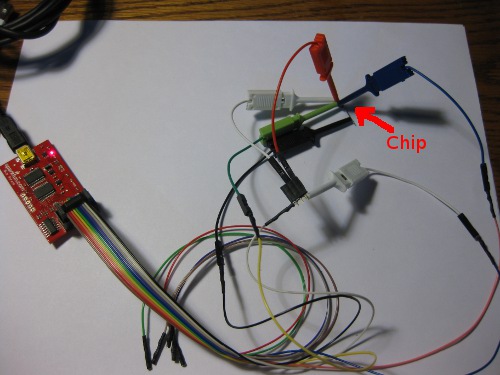
24c64dump_sm.jpg

To be specific the connections are GND to pins 1-4 (Gnd, A2, A1, A0) 3.3V to Vcc (8) and WP(7), CLK to SCL (6), and MOSI to SDA (5) like so:
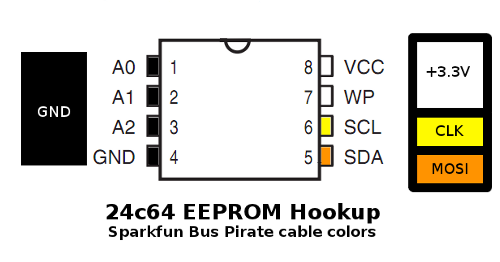
24c6pins_sm.png

To write the ROM, the WP pin would need to be grounded instead of powered, but preventing writes is a good safety measure when exploring.

Software-side, I ended up following the communication instructions in the Bookly 24c64 datasheet, because I found them asier to interpret, but the datasheets from Atmel or any other manufacturers that make a compatible part will do as well. Start with the usual bus pirate setup of ‘m’ for menu, ‘4′ for I2C, Chose a clock (I used 100kHz for fear of interference from the long-for-I2c leads), ‘P’ to turn on pull-up resistors, and ‘W’ to turn on the power supplies.

Then, to read out a 24C64, you feed it (this is a commented log of the terminal session)

I2C>[0xA0 -- Start, Send 1010, the Values on the A2-A0 pins (000 if grounded), Followed by 0 write for and 1 for read -- dummy write to set address pointer
I2C START BIT
WRITE: 0xA0 ACK
I2C>0x00 -- Send the start address to the chip, the 24c64 ignores first three bits. 0x0000 to start at the beginning of the ROM.
WRITE: 0x00 ACK
I2C>0x00
WRITE: 0x00 ACK
I2C>[0xA1 -- Starts, then random read (same as first byte of dummy write, with R/W high instead of low)
I2C START BIT
WRITE: 0xA1 ACK
I2C>r:255 -- Sequential read out the whole ROM (Overflows most terminal's history, I pulled 256 or 512 at a time.)
READ: 0x5A  ACK 0xA5  ACK...

I dumped it twice to cross-check that I didn’t make any dumb mistakes the first time, then massaged the dump with some regexes to get rid of the communication details and extract a pure hex dump. Only the first 4608 bytes of the ROM are written, so there is even room to tamper, if I can figure out the encoding. Note that the posted string is NOT S-records or Intel HEX, but raw ASCII-encoded two-characters-per-byte hex. In order to get it into an 8051 disassembler for further analysis, I will either need to figure out how to coax the Bus Pirate to generate a formatted dump, or write a script to segment and prefix the existing string, but neither has happened yet.

Giving analysis a first pass, I looked for pieces of the string it prints when activated as ASCII and raw USB HID Scancodes, but didn’t find them… which either means there is a problem with the dump (byte order?), or some clever and inconvenient encoding was used. I’m not terribly familiar with 8051s and their associated tools, so that will be the rather large next step. If nothing turns up in analyzing the dump, I may have to sniff the bus while the board is in operation to see if there is some funky data layout obfuscation.
Posted in Computers, DIY, Electronics, Objects, OldBlog | Tagged , , | 1 Comment

Bus Pirate!

I lost yesterday evening to the happy distraction that usually follows a little red box showing up in the mail – The Bus Pirate and cables I ordered from Sparkfun with my Free Day winnings arrived.
It is a very cool little tool, and the accessories all work nicely – with the slight caveat that the Sparkfun cable is the reverse of the seedlabs/adafruit layout. There is a handy guide, but there are references to the colors in the firmware which don’t match… neither layout has any intrinsic advantage, although I do like that the Sparkfun model has GND on the black conductor. The test hooks I got with it have EXCELLENT grabby little tips, and are small enough to attach to adjacent pins of an SOIC, but do have an occasional problem with the jacket/part you press to extend the tip sliding back too far. That said, they are overall better than the ones on the expensive old logic analyzers on campus, so no complaints.

As for set up, the BusPirate just presents itself as a 115200/8/n/1 USB serial device, with a simple textual interface, so it will work on any machine with a USB port and serial terminal software (I like gtkterm on Linux and PuTTY on Windows). The developers offer regular firmware upgrades, and the SparkFun model ships with woefully out of date firmware and bootloader, to the point that the upgrade process is now mildly nontrivial (follow the instructions carefully). I did end up booting a machine into Windows for the update because the python update script was being problematic, and I wasn’t especially keen on bricking brand new hardware, but I got up to the current v4.3 bootloader and 5.10 firmware without too much fuss.

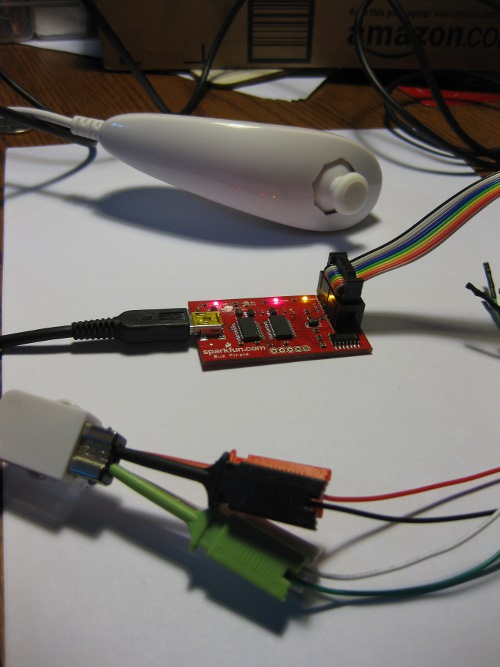
For a quick test, I grabbed my wiimote nunchuck and connected it up to the BusPirate. Wii accessories just speak slightly-obfuscated I2C among themselves, and there is a handy example for the process of reading one with a bus pirate. That whole process only took maybe half an hour, including plenty of time to explore the bus pirate’s features. The only slight hangup was that the BusPirates’ pullup line needs to be EXTERNALLY connected to a power source, even though the resistors can be software enabled. It would be nice to be able to connect (jumper block style) it to the on-board Vregs without extra loops in the wire harness.

wiimote_i2c_sm.jpg

One of the first things I want to do with it is tinker with the PIONIER Button that I have lying around from a conference giveaway a few years ago. The hold-up on that little project was getting access to the 24c64-type EEPROM which (presumably) holds at least the written string it writes, and probably the code it runs. I’m hoping for obvious “string preceded by length in bytes” type encoding. The 24c64 speaks two wire serial (which *usually* means not-quite-compliant I2C) with some external address lines, and the address lines are pre-grounded on the board, so at least reading the thing out shouldn’t be too hard, even if I may have to lift pins to separate it from the uC and enable writes…

Posted in Computers, DIY, General, Objects, OldBlog | 1 Comment

Coffee Tour

I’m on the dry side of the big island in Hawaii right now, and the Kona cost is an amazing place for coffee dorks; I took a tour of the Greenwell Farms Coffee Plantation, a 150 year old traditional (but not modern definition organic) coffee operation in the heart of the Kona coffee band today, and subsequently spent a ridiculous amount on coffee both for me and to spread around as gifts.

Some pictures from the tour:

coffeegrove_sm.jpg
A grove of coffee trees, of Guatemalan ancestry, grafted onto hardier Tanzanian root stock. Picture is taken down one of the idled rows that was chopped short last season to encourage fruiting instead of growing the tree
.
coffeecherries_sm.jpg
A nice close up of some unripe (green) and (roughly) ripe (red) coffee cherries.

poppedcoffee_sm.jpg
A dissected cherry in-hand. Whole cherry has a texture and appearance sort of like a cranberry. The skin is very firm and a bit bitter, the greenish pulpy flesh is very similar to a pomegranate kernel in texture and flavor, with the hard coffee bean inside. Coffee cherries have a shelf-life measured in hours, and virtually no meat, so you can’t get them away from the farm, but apparently in addition to being delicious, possess a variety of healthy properties – So much so that a company has finally figured out how to stabilize a juice product, and are marketing it as KonaRed, as some kind of super-dose antioxidant. Greenwell happens to be the sole source for cherries for manufacturing the stuff. I bought a bottle, and a couple packets of dehydrated, but haven’t tried it yet. I have high hopes for deliciousness.

dryingcoffee_sm.jpg
A bed of green coffee, in a hoshidana (sliding roof) to protect it from the daily rain, drying in the sun.

The tasting on the tour is the most effective sales pitch imaginable, as several of their products are absolutely delicious. I found the single-source estate coffee to be a little earthier than I like, but their Peaberry is spectacular, and the classic for Kona medium roast is exemplary. The fun specialty is roasted chocolate coated peaberry beans that make normal chocolate covered beans seem unpleasant, and are about 4-5 beans to the cup of coffee in terms of caffiene content, making them a significant threat to my continued wellbeing.
One of the big things I hoped to get to here, and a great way to spend an afternoon.

Posted in Entertainment, FoodBlogging, General, Objects, OldBlog | Tagged | Leave a comment

EE281 Car: Mixed Success.

281car.jpg
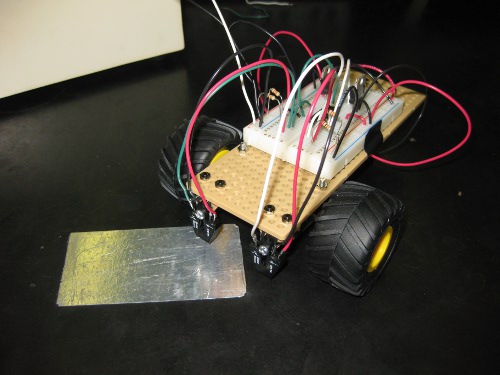
This week we did the lab the parts in my New Teaching Robots post were for, and it was very much a “mixed success” sort of situation. I put a test chassis and circuit together about a week and a half ago, and modified the sample solution from the crappy old cars to work with the new ones, and that was reasonably successful, although it did exhibit a little bit of sluggishness and jitter, which, in retrospect, I should have taken as a warning sign.

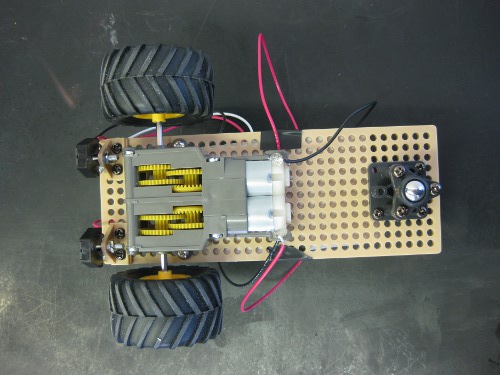
Last week we had a build party to put the chassis together, so that interested students in the class, as well as other people interested in robotics, could come play with the parts (and perform the repetitious part of assembling a small fleet of identical machines). That event was quite successful, resulted in a collection of 6 mostly complete chassis, and a lot of enthusiasm. I even had one student build a circuit to ensure that would be reasonable, and that went well.
281car_bottom.jpg

For the lab, we told students upfront that it was an experimental new lab they were participating in the design of, rather than something routine they were simply expected to perform. This was a good call, as it immensely with investment in the activity, and to reduce frustration when things didn’t work as planned for reasons outside of their control.
There turned out to be three basic problems with my design for the lab:
– In our enthusiasm for the new cars, both the faculty instructor for the course and I forgot that the protoboard power supplies usually used in this lab don’t tolerate the >1.5A spikes from driving substantial inductive loads well. This was a major compounding factor, and the most likely cause for the sluggishness I observed in the test case. This was fixed for the last section (there are nice 4-channel 5A variable output supplies in the lab), which helped alleviate some of the flaky behavior.
– I seriously overestimated the fabrication skills of most of the students. They haven’t developed what I consider “natural” design practices as far as physical layout or EMC, so constructing physically and electronically robust circuits on the small section of breadboard attached to the backs of the chassis was out of reach for many of them. I was very hands on with each group once the problem became clear, and had the latter two sections build some parts of the circuit off-board with suggestions, but it was still an issue.

281car_cable.jpg
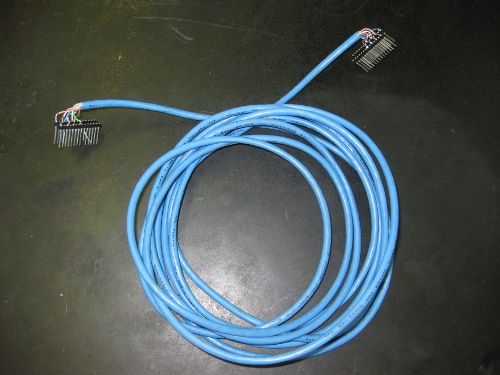
6+ feet of Cat5 cable (twisted pairs) carrying ~5V signals switching at various speeds in the 0-100kHz range are one hell of an electromagnetic echo chamber, and I didn’t adequately account for that in the design. I’m still not sure how much of the strange behavior this can be blamed for, but there were sufficient effects to require substantially different passive components depending on which end of the cable which section of the circuit was built.

The latter two problems could have been alleviated, and the first one discovered much earlier, if we had stuck with the original plan to have PCBs milled and pre-assembled for all the discrete components, with fixed cables for attaching the FPGA boards the state machines were designed on. Hopefully at some point in the not-too-distant future there will be a chance to get that done for next semester.

Despite the problems, all the students were engaged, and a lot of them stayed and played with their design even after we told them they had done enough to be counted as completing the lab. In terms of educational outcome, we lost the excitement of making something which can move around reliably on its own (except for several groups who set up simple wired feedback from the sensor to the FET while they finished their sate machines…), but in explaining the various ways in which things went wrong, gained brief, simple, practical exposure to concerns in drive systems, emc, fabrication, and at least half a dozen other topics they will be taking courses in over the next two years. Most importantly it exposed students to some of the process of engineering whole systems, which is something one rarely gets until working on one’s own projects. I do wish it had gone as smoothly as the adder lab I replaced with a comparison of different adder designs (in Verilog) last semester, to introduce size/speed performance metrics, procedural test-benches, and the RTL/Tech schematics generated by ISE, while still teaching the basic lesson in binary arithmetic, but things did go surprisingly well for the level of unforeseen technical difficulties.

I feel almost as bad about spewing the above stream of awful loaded-meaning education jargon as the shortcomings of my plan, but there is no language I’m aware of for discussing the education process that hasn’t been co-opted by idiots.

Posted in DIY, Objects, OldBlog, School | Leave a comment

New Teaching Robots

281botparts_sm.jpg
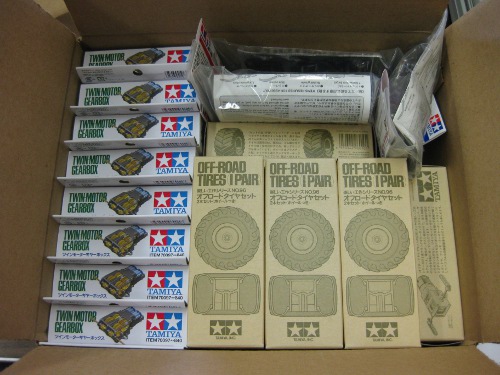
Some days, I really love my job. That is the mechanical parts for 8 little teaching robot chassis I quickly designed, which will be used for, among other things, a late-in-the-semester EE281 lab where students develop their own line-following state machine and PWM motor control. Nice little Tamiya modular platforms with infrared reflectivity sensors to replace of the horrible, flaky, ten year old toy trucks with de-soldering braid brush sensors that are currently used. I will be recruiting folks (preferably undergrads with an interest in robotics) to assemble sometime next week after the rest of the parts get in.

Posted in DIY, Objects, OldBlog, School | 1 Comment

Spiffchorder Progress

As I mentioned when the parts arrived, I recently decided I wanted to build myself a Spiffchorder to play with, and, more generally, play with the VUSB Stack, which provides software USB for most AVR microcontrollers, using a few cents worth of extra passive components. This seems to be an excellent generic solution to the “Modern computers don’t have hobby-accessible I/O” problem for most applications. I’ve actually been using a VUSB device for a while since my usbtiny AVR programmer is an ATTiny2313 running VUSB with some additional support chips and code.

When I ordered parts, Newark was out of suitably-packaged ATMega168 chips, and their larger (RAM/ROM), pin-compatible sibling the ATMega328p was so close in cost I would have ordered them anyway. There is a warning(#8) about -p suffix chips (stands for PicoPower, meaning some additional power staving features) and VUSB, but it seems to be a simple problem with naming conventions in the interrupt vectors, and is fixed in recent versions.
I’ve been grabbing an hour here and there to put it together over the last week. So far, I’ve already spent some time on one of my favorite activities…
spiffwork_sm.jpg
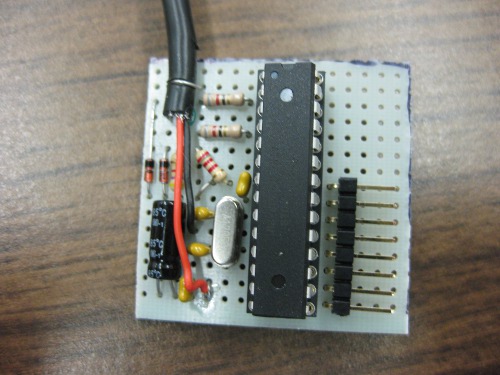
which produced a nice tight board (The back isn’t quite as neat, and the socket I ended up using suuccckkkks)
spiffboard_sm.jpg
which, as far as I’ve discovered, had only one assembly error (the pull-up network on D- was between ground and… ground because I counted wrong), which was easily remedied.
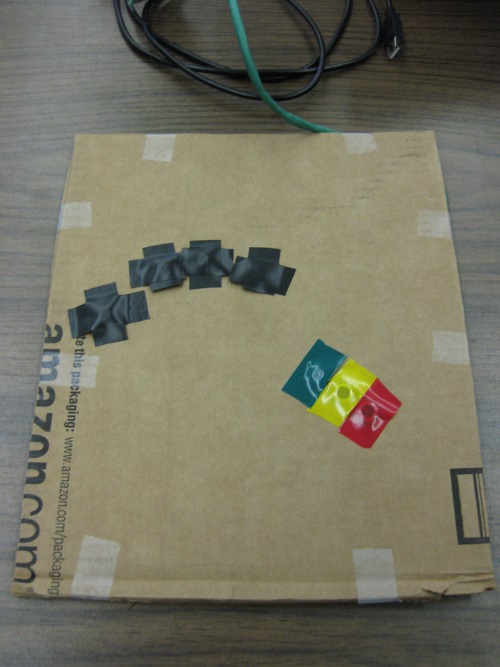
While I was assembling I also put together a half-assed first approximation keyboard to test with
spiffkeys_sm.jpg
Which will eventually be upgraded… I’m thinking something flexible that can be clipped to the outside of my left pants pocket, or flopped on a flat surface such that the clip maintains the curvature, but I really just want to play with it and see how (un?)comfortable it is to use a chording keyboard. Maybe I’ll get bored and build a key-glove, those always look fun (and useless).

Now for the real problems… even after I fixed the wiring glitch, and touched up the code (minor fixes to make it recognize the 328p and set the fuses correctly), I wasn’t getting anything when plugged into USB. I borrowed a 168 from another project (and transparently swapped in a 328p there) to test the vanilla code, and it resulted in a board that generates a stream of errors like

usb 2-1.1.3: new low speed USB device using ehci_hcd and address 15
usb 2-1.1.3: device descriptor read/64, error -32

when plugged into any of my various Linux boxes. I then decided to upgrade the VUSB version (the one the 0.98 release is built against is truly ancient), which only took a few minutes of tampering to set up the usbconfig.h (and Makefile) to work with the Spiffchorder sources and IDs. Unfortunately, this only fixed the 328p problem… it now does exactly the same thing as the vanilla 168 version, and produces a string of USB enumeration errors when plugged in.

My understanding is that -32 errors are usually something to do with devices that aren’t correctly handled by ECHI (USB2) mode controllers, but a device that requires you disable ehci mode on a modern computer is pretty much useless, and it doesn’t appear VUSB should have that limitation. This is my current working tree, it seems to be at least as sound as the distributed version; when I get it working I’ll ping the original author about the update, and replace these if it turns out to be a software problem. I’m going to hook it up to some instrumentation on campus tomorrow to see if I can find the problem, I suspect something screwy with the voltages on the USB Data lines.

Posted in Computers, DIY, Entertainment, General, Objects, OldBlog | 1 Comment

Zero History

(This should be spoiler free)
I just finished reading Zero History, slowly, both because I don’t have much time to do so, and because I was savoring it. That kind of writing is the closest thing to a religious experence those of us who don’t do faith get to have. Note that when I say “slowly” I mean “over the course of 2 weeks, since my copy arrived;” had I not been drawing it out it would have been more like two sittings.

Firstly,do NOT read it without first reading Pattern Recognition and Spook Country. A majority of the characters are common, and are thus introduced without preamble. There are also enritching references to the earlier novels throughout, including several major plot elements which are best left as surprises. On the topic of surprises, I hit an “Oh. Oh holy shit” 335 pages (of 404) in. The first time a book has surprised me in AGES, and it is a wonderful surprise that ties the Bigend trilogy together… and then, in standard Gibson style, entirely loses relevence to the narrative. The revelation is neatly enough laid that one could have figured it out prematurely, but is elegantly enough veiled to discourage such things. Imagine reading Dan Brown and NOT knowing the answer in the first few pages.

Gibson’s writing constantly pushes my vocabulary (which, as one might expect based on how much crap I get for my ordinary diction, is a very unusual thing), and my cultural knowledge (which, again, is unusual; I compulsively consume two news magizines and an unholy lot of Internet every week). I far prefer reading his more recent work with google in reach to fill in the gaps in both, something he has suggested is intentional, or at least approved of.

Looking at the whole trilogy, Pattern Recognition is still perhaps my favorite single novel, and I was disappointed when Spook Country came out, although that may be residual effects from my first attmept to read it in a codeine-induced haze; I literally got the book on the way back from having my wisdom teeth out. There is no disappointment with Zero History – it has all the marvelous locution, and fabulous collection of ethereally related plots that I read Gibson for. In fact, it makes Spook Country better, by tying all it’s plots into a greater system, making them more interesting than they were on their own, like the disinteresting constituent bits of a fascinating mechanical device. I don’t think Zero History stands on it’s own nearly as well as Pattern Recognition, but, particularly as the improved sucessor to Spook Country, it is an excellent novel.

The one nagging concern I have when I think about the Bigend trilogy is about it’s longevity: they are heavily, heavily steeped in ephemera of the moment, to the point that it is partly their topic, and it is unclear to me how well that will age. Pattern Recognition is my favorite largely out of fondness and nostalgia for the ‘now’ it was written in, although also out of a taste for it’s overt topic. It least suffers the problem simply because it predates much of the internet’s collective consciousness, despite having said consciousness as one of its chief concerns. In contrast, Zero History is made up of ecclectic references to Festo’s more eccentric products, iPhones, quadrotor drones, and ekranoplan; things renderd exciting through the fickle fascinations of the interent. Hopefully, like the Curtas and origional toilet seat iBook that filled such roles in Pattern Recogniton they will continue to stand on their own interest.

In short: Go read it, and it’s prequels if you haven’t. It is by far the best novel I’ve read (for the first time) in years, and retains all the enjoyable trappings of popular fiction, despite its literate complication.

Posted in Entertainment, General, Literature, Objects, OldBlog | Tagged , | 2 Comments

T60p Repair

I opened up my old T60p for some repairs the other night, just posting to share what I did now that I’m reasonably certain it worked. The objective of this project was to do something about the relatively high temperatures and annoying buzzing noise coming from the cooling system. This particular machine is on it’s third cooling assembly (the assembly was replaced twice under warranty), and based on comments on from other owners, thermal issues and rattling fans are endemic to the model, mostly thanks to a few poor design decisions.
The surgery:

  • * Oiled (I used BSB Speed Bearings Lube, which is probably Sililcone oil with some adulterants to make it Shear thinning) the fan assembly, basically following msb0b’s guide. The only major deviation is that instead of cutting the aluminized tape, I just used it as a hinge and folded back the jacket. I also note that there is some foam insulation tape on my heatsink assemby, presumably added in later manufactured asssemblies to help with vibrations.
  • * Bent (compound bend) the heatpipe to lower the GPU section about 2mm, as some of the folks in this thread suggest. Basically, I put some thermal paste on the GPU, and bent and reseated until the contact area was appropriate. I was a little afraid bending the heatpipe would harm it (efficiency wise), or crack it from metal fatigue, but nothing was damaged and the contact is better. This is a logical fix- those thermal pads never provide very good conductivity, particularly where they are reasonably thick.
  • * Replaced the CPU thermal compound and GPU thermal pad with Arctic Silver Ceramique (my favorite for almost all thermal-conductivity needs). I left the thermal pad on the north-bridge intact, as there don’t seem to be any major thermal issues with that component, and the pad over it wasn’t damaged.

Based on some cursory tests, the system is running cooler (Both overall and CPU-GPU delta) than it did even with a new cooling assembly. Idle, I’m seeing 43/41c (5-10 degree reduction), and a half-assed “Stress Test” running SupCom for a few minutes only produced temps in the low 80s, with the GPU about 5deg hotter than the CPU– my recollection is that the GPU tended to be in the high 90s under similar conditions, and the CPU in the mid 80s. The big win is on noise; the irritating rattle is gone, and the fan is at most a tiny bit louder than a new one, based on a procedure I should be able to replicate for free.

The wonderful thing about Thinkpads is that they are designed to be mostly user-serviceable (Lenovo cooperatively provides the service manuals as PDFs online, and even allows FRU orders), and they are very common machines, so there are lots of other people playing with them and sharing their experiences, making things like Linux support and after-market mods particularly well explored and documented. Even with the slight design issue, the T60p was a solid machine for 3.5 years, and I far prefer serviceable and working well to being unserviceable and being “slicker… until it dies”. Speaking of vendors of unserviceable hardware, I’m considering setting it up as a hackintosh (at least on one partition) just for fun when I get some time…

Posted in Computers, DIY, General, Objects, OldBlog | Tagged , | Leave a comment

New Laptop!

My new laptop arrived thursday, and it is a beautiful thing.
t510t60p_sm.jpg
(It should be pretty apparent which one is the new one…)

It is a Lenovo ThinkPad T510 (4313 Chassis), with a Core i7 620M (2 cores at 2.66Ghz, Hyperthreaded to 4), 8GB of RAM, a 15.6” 1920×1080 LED Backlit screen, Nvidia Quadro NVS 3100M graphics, 500Gb 7200RPM HDD, and lots of doodads)

Like a good geek, the first two things I did, after booting it up to check that everything worked, were opening it up to poke around and upgrade the RAM (Like all OEMs, Lenovo WAY overcharge for RAM), and blowing away the included Windows Whatever(tm) install for an ArchLinux system (and a smaller partition with a …”fixed”… copy of Windows 7 for games and such).

It is tentatively named “Ahu” in keeping with my “Man made stone structures” naming scheme for full sized computers. (Current active machines are a Lenovo T60p named “Monolith” and a used, modified Dell Optiplex GX280 named “Dolmen”)

Just to keep them together:
Things I like:
* The screen is GEORGOUS, bright, good colors, and 1920×1080 is a whole lot of pixels. Way, Way better than the T60p, even when it was new.
* This thing is a powerhouse. Not “Mindblowing” fast, but close, and 8GB of RAM covers a multitude of software sins.
* nVidia graphics, simply because the nVidia drivers are a lot less of a hassle than the ATI ones under Linux.
* SD Slot – I have lots of SD-using devices, it seems to be the defacto standard, having one built in is super handy.
* Build quailty – It feels sturdy. Actually, even sturdier than the T60p, no squeaks, rattles, or flexing.
* Rounded edges – They screw with the classic Thinkpad aesthetics a little bit, but it means the angles where the palm rest has a sharp edge in your wrists are gone (except for one spot on the right where the latch sits).

Things I dont’ like:
* The textured, flush touchpad is TERRIBLE on first use. It is clumsy to use (different resistance pushing and pulling), feels bad, and doesn’t have recessed edges to put your finger against when scrolling. I’m one of those weirdos who actually likes touchpads, and the one in my T60p is excellent, so this is quite a disappointment. I seem to be acclimating, but it still isn’t as comfortable as it’s predecessor.
* The machine is bulky; If I could have a new 4:3@15” with decent (>1050 vertical lines) resolution I would have gone for that, but they simply don’t make them anymore. 16:9 is a stupid shape for computers. Unfortunately, all my stuff is sized for 4:3@15”, so despite my careful purchase of a matching sleeve, the damn thing doesn’t fit in some of my normal bags and accessories.
* There is a cutout in the palmrest for some part I don’t have, I think a pantone color calibration sensor? or possibly the fingerprint reader? with a blank cover in it. My fingerprint-reader-less T60p has a smooth palm rest with no slot, I was hoping for the same.
* No ThinkPad goodie bag. My T60p came with a variety of extra Trackpoint (eugh) nubs, some “security” (Torx) screws, and some other trivial accessories. It was a nice touch, that is now gone.
* Exposed optical eject button: This thing is so well designed it’s really noticeable that there is an oversight in that the eject button is placed where it is pressed when picking the laptop up by the sides.

Most of the gripes are incredibly minor, and I’m really, really pleased with the machine. I’m Currently in the process of taking it from “shiny new piece of hardware” to “home,” which takes a while for me. Most of the configuration is working well, even the parts I’m doing differently (trying to avoid tpb and use direct acpi or xfce features). Convienently, Arch just added a proper multilib repository (literally the day I got the machine), so none of the old 64 bit OS disadvantages are asserting themselves.

Posted in Announcements, Computers, General, Objects, OldBlog | Tagged , | Leave a comment