Category Archives: Computers

Spiffchorder rides again

I’ve been putting a couple hours every evening into the long, long list of hobby projects that haven’t been touched for the last 10 or so weeks. One of the successes on this front is getting to touch the Spiffchorder I was working on.

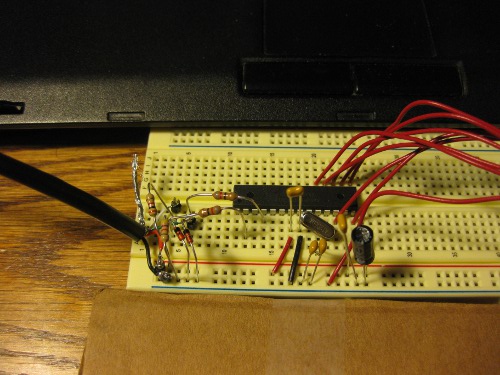
I had to pull the reusable parts (always socket your uC…) and trash the one I assembled on perfboard; after all the modifications and false starts it was a non-functioning mass of solder balls and lifted pads. I then threw one down on a breadboard, as other had reported sucess starting that way even though breadboarding something with a 12Mhz clock is a little bit electrically dubious.
bbspiff_sm.jpg
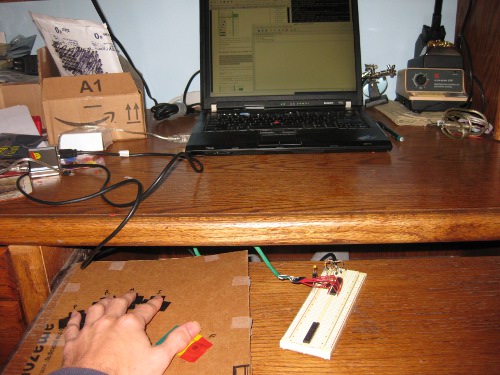
I got this version working on the second try, and second only because the version of the code I modified to work with a (generally drop-in compatible and easier to source) ATMega 328p, instead of the 168 or 8 recommended by the original design is still not working properly. I suspect it is more of the issues with V-USB interrupt behavior on -p type chips, but haven’t attached it to anything that can trace fast enough to watch USB. That said, the code works fine on the one 168 I have in the parts bin (I think it was stolen from an updated arduino diecimila?), and the crappy first-pass keyboard I made for testing is… good enough to feel out the chords on, but not much else. The chord-set is actually pretty easy to work with, and I can see how it would be a comfortable (particularly in terms of “not further accelerating the joint damage to my hands”), convenient and fast input system.
spiffuse1_sm.jpg
Now to build a working board, a better keyer/keyboard[s], and fix the 328p code so I’m not tying up my only 168.

Posted in Computers, DIY, General, OldBlog | 3 Comments

Bus Pirate!

I lost yesterday evening to the happy distraction that usually follows a little red box showing up in the mail – The Bus Pirate and cables I ordered from Sparkfun with my Free Day winnings arrived.
It is a very cool little tool, and the accessories all work nicely – with the slight caveat that the Sparkfun cable is the reverse of the seedlabs/adafruit layout. There is a handy guide, but there are references to the colors in the firmware which don’t match… neither layout has any intrinsic advantage, although I do like that the Sparkfun model has GND on the black conductor. The test hooks I got with it have EXCELLENT grabby little tips, and are small enough to attach to adjacent pins of an SOIC, but do have an occasional problem with the jacket/part you press to extend the tip sliding back too far. That said, they are overall better than the ones on the expensive old logic analyzers on campus, so no complaints.

As for set up, the BusPirate just presents itself as a 115200/8/n/1 USB serial device, with a simple textual interface, so it will work on any machine with a USB port and serial terminal software (I like gtkterm on Linux and PuTTY on Windows). The developers offer regular firmware upgrades, and the SparkFun model ships with woefully out of date firmware and bootloader, to the point that the upgrade process is now mildly nontrivial (follow the instructions carefully). I did end up booting a machine into Windows for the update because the python update script was being problematic, and I wasn’t especially keen on bricking brand new hardware, but I got up to the current v4.3 bootloader and 5.10 firmware without too much fuss.

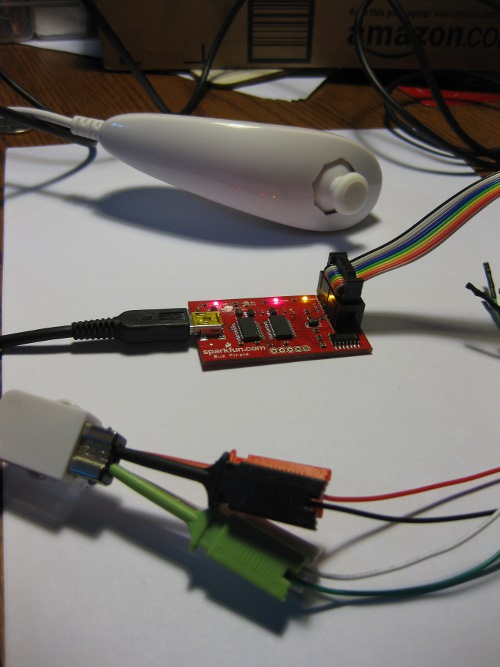
For a quick test, I grabbed my wiimote nunchuck and connected it up to the BusPirate. Wii accessories just speak slightly-obfuscated I2C among themselves, and there is a handy example for the process of reading one with a bus pirate. That whole process only took maybe half an hour, including plenty of time to explore the bus pirate’s features. The only slight hangup was that the BusPirates’ pullup line needs to be EXTERNALLY connected to a power source, even though the resistors can be software enabled. It would be nice to be able to connect (jumper block style) it to the on-board Vregs without extra loops in the wire harness.

wiimote_i2c_sm.jpg

One of the first things I want to do with it is tinker with the PIONIER Button that I have lying around from a conference giveaway a few years ago. The hold-up on that little project was getting access to the 24c64-type EEPROM which (presumably) holds at least the written string it writes, and probably the code it runs. I’m hoping for obvious “string preceded by length in bytes” type encoding. The 24c64 speaks two wire serial (which *usually* means not-quite-compliant I2C) with some external address lines, and the address lines are pre-grounded on the board, so at least reading the thing out shouldn’t be too hard, even if I may have to lift pins to separate it from the uC and enable writes…

Posted in Computers, DIY, General, Objects, OldBlog | 1 Comment

SC10 Review

A quick review of my observations from SC10.

The two takeaway messages from the show floor this year:
1. “We’ve all bought these damn GPUs, now how do we make them work?”
2. “Everyone should want the shiny flash storage devices, even though their capacity, price, and especially lifespan are still kind of dubious.”

As for my experience, I had some excellent discussions with people from The Portland Group, AMD, ARM, and various universities, and the always interesting opportunity to meet many of the advisor’s former gradstudents. We also had the yearly Burton Smith update, which provided excellent food for thought, as you might expect from anyone who is in the “Microsoft Fellow, paid to do whatever they feel like as long as Microsoft gets dibs on the results” phase of life.

The aggregate.org/University of Kentucky booth was pretty successful, with the usual handmade look, with the lighted sign tower/print on demand system as last year, a new hexagonal structure with three large rear projection screens, and the MOG Maze. We were kind of worried about being next to nVidia on the show floor, but it turned out to be a good thing, in that it attracted lots of the right kind of people to be interested in our research, and allowed us to hear the 5 minutes of technical content from each of their 30-minute talks.

I should also mention that we learned that Under NO CIRCUMSTANCES should anyone, ever ship with YRC, who managed to not only damage our packed booth, starting with damage to the pallet before it even left Lexington, but delivered it on a different, crappier pallet than it left on.

We were also given a hacked router set up for MIT’s RoofNet mesh system, which we ran in our booth during the show as part of an experiment Kurt Keville was running to test Roofnet under congested conditions (10,000 geeks VS Wifi Network is a special opportunity), which is pretty cool and I hope to get to play with later.

One of the most impressive displays on the floor was Hardcore Computer’s incredibly well polished liquid immersion cooling systems. A base price of $5k for a desktop system like that is not even unreasonable.

And now for the fun stuff, mostly to shout out vendors who gave me good crap:
Best Party: The Exhibitor Reception, which, among other things, had excellent duck etouffee and a great hosting venue.
Runner up party: The FusionIO afterparty, which, while not very well attended, was directly across the street from the conference center, and had free food, free booze, and pushed the limits of good taste…

fusioniofun_sm.jpg
(FusionIO Employee. “Mounting” a hard drive motif mechanical bull. In a skirt. Saints cheerleaders in the background.) They also had a reasonably neat shirt (top right below).
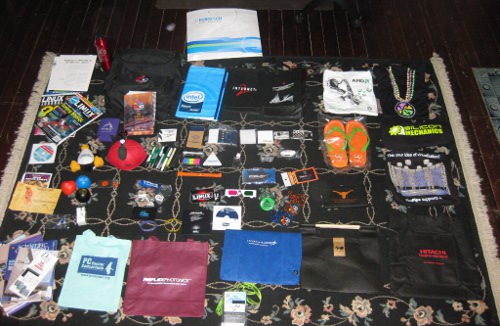
And from the swag:
sc10swag_sm.jpg
Best Bag: The Conference bag. It isn’t terribly well made, but it is a neat layout.
Best Shirt: Silicon Mechanics wins again. I wear their shirt from last year all the time, its just a great design.
Best Pin: Teradactyl’s little pewter-finish pterodactyl pins. They also get points because the advisor won a pterodactyl-shaped RC plane in a drawing.
Best Toy: Penguin Computing’s standard stuffed Tux, which has now joined the rookery on the back of my printer.
Best Pun: The TeraGrid PetaFlops flip-flop sandals.
Best Office Supply: Sandia National Lab’s little tape-flag/postit selection folders.

LinuxJournal and LinuxMagizine both gave out sample issues, and I may end up subscribing to one or the other, I haven’t had a paper user-centered computing magazine since I lost interest in Macs and dropped my MacAddict subscription in 2002 or so.

A couple vendors were giving out copies of their tools on CD, the most interesting to me was copies of the Open64 toolchain from AMD, which I’ve heard about but never had the opportunity to play with.

Overall, it wasn’t quite as awe-inspiring for me as last year, but I suspect that has as much to do with having seen it before as any difference in the show. There was certainly a lot of good personal networking going on both indivdually and for the research group, and there really is nothing else quite like Supercomputing, the mixture of research and industry creates an incredible intense experience, which is, as far as I know, completely unique.

Posted in Computers, Entertainment, General, OldBlog, School | 1 Comment

User Agent Blocking

I was watching some TV shows online while recuperating from Supercomputing, and ran into this:
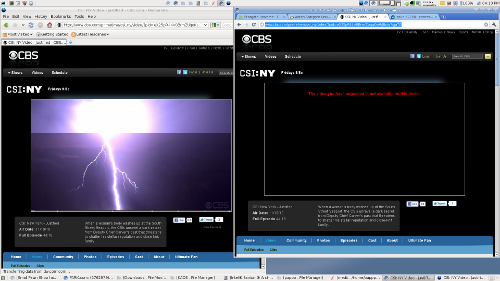
“The video you have requested is not available on this device” in Chromium, normal play in Firefox.
cbsuseragentdetect_sm.png
Apparently, CBS is blocking video on Chrome/Chromium on Linux in a misguided attempt to block GoogleTV devices. This is why user-agent sensitive web content is bullshit. Browsers are browsers; if you feel like your business model can’t deal with the internet, you have a much, much bigger problem than malicious web design can solve.

Posted in Computers, Entertainment, General, OldBlog | Leave a comment

Spambots.

I seem to have a minor spambot infestation in my blog comment system. I’ve cleaned it out for now, but this most likely means the anti-spambot measures in Flatpress have been defeated.
I should probably upgrade my Flatpress install to the latest version, but I am hesitant to do so since I won’t have time to fix it for the next several weeks if something goes wrong, and I am planning to move this blog to it’s own hosting (yet undetermined) in the immediate future.
Please excuse any temporary spam incursions until I have a more permanent fix for the problem.

Posted in Computers, Meta, OldBlog | Tagged | Leave a comment

SC’10

My research group is headed down to the IEEE/ACM Supercomputing Conference next week in New Orleans to put on our customary research exhibit. This year’s booth features a large 6-sided figure with three 6-foot screens on the longer spans, in addition to the lighted sign tower, print on demand whitepaper system, and low tables from last year. The MOG Maze returning for its third year on the show floor, with a new faster more flexible version of the MOG environment (mostly) ready for distribution.
Last year was a blast, and SC is an experience unlike any other, a bizarre mix of trade show and technical conference which creates an environment more exciting than either on its own. The various shakeups in the HPC world of late, particularly that monstrous Intel Xeon/ Nvidia GPU/custom interconnect thing that China built, showed a few weeks ago, and have declined to share technical details about, should make this year especially exciting.

Posted in Announcements, Computers, OldBlog | Leave a comment

Spiffchorder Progress

As I mentioned when the parts arrived, I recently decided I wanted to build myself a Spiffchorder to play with, and, more generally, play with the VUSB Stack, which provides software USB for most AVR microcontrollers, using a few cents worth of extra passive components. This seems to be an excellent generic solution to the “Modern computers don’t have hobby-accessible I/O” problem for most applications. I’ve actually been using a VUSB device for a while since my usbtiny AVR programmer is an ATTiny2313 running VUSB with some additional support chips and code.

When I ordered parts, Newark was out of suitably-packaged ATMega168 chips, and their larger (RAM/ROM), pin-compatible sibling the ATMega328p was so close in cost I would have ordered them anyway. There is a warning(#8) about -p suffix chips (stands for PicoPower, meaning some additional power staving features) and VUSB, but it seems to be a simple problem with naming conventions in the interrupt vectors, and is fixed in recent versions.
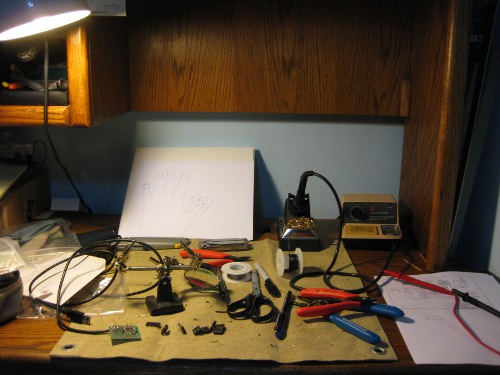
I’ve been grabbing an hour here and there to put it together over the last week. So far, I’ve already spent some time on one of my favorite activities…
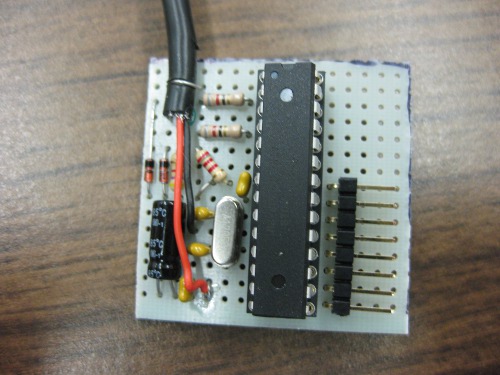
spiffwork_sm.jpg
which produced a nice tight board (The back isn’t quite as neat, and the socket I ended up using suuccckkkks)
spiffboard_sm.jpg
which, as far as I’ve discovered, had only one assembly error (the pull-up network on D- was between ground and… ground because I counted wrong), which was easily remedied.
While I was assembling I also put together a half-assed first approximation keyboard to test with
spiffkeys_sm.jpg
Which will eventually be upgraded… I’m thinking something flexible that can be clipped to the outside of my left pants pocket, or flopped on a flat surface such that the clip maintains the curvature, but I really just want to play with it and see how (un?)comfortable it is to use a chording keyboard. Maybe I’ll get bored and build a key-glove, those always look fun (and useless).

Now for the real problems… even after I fixed the wiring glitch, and touched up the code (minor fixes to make it recognize the 328p and set the fuses correctly), I wasn’t getting anything when plugged into USB. I borrowed a 168 from another project (and transparently swapped in a 328p there) to test the vanilla code, and it resulted in a board that generates a stream of errors like

usb 2-1.1.3: new low speed USB device using ehci_hcd and address 15
usb 2-1.1.3: device descriptor read/64, error -32

when plugged into any of my various Linux boxes. I then decided to upgrade the VUSB version (the one the 0.98 release is built against is truly ancient), which only took a few minutes of tampering to set up the usbconfig.h (and Makefile) to work with the Spiffchorder sources and IDs. Unfortunately, this only fixed the 328p problem… it now does exactly the same thing as the vanilla 168 version, and produces a string of USB enumeration errors when plugged in.

My understanding is that -32 errors are usually something to do with devices that aren’t correctly handled by ECHI (USB2) mode controllers, but a device that requires you disable ehci mode on a modern computer is pretty much useless, and it doesn’t appear VUSB should have that limitation. This is my current working tree, it seems to be at least as sound as the distributed version; when I get it working I’ll ping the original author about the update, and replace these if it turns out to be a software problem. I’m going to hook it up to some instrumentation on campus tomorrow to see if I can find the problem, I suspect something screwy with the voltages on the USB Data lines.

Posted in Computers, DIY, Entertainment, General, Objects, OldBlog | 1 Comment

SC’09 Video

I did a taped group-promotion and demonstration of the MOG Maze at Supercomputing last year, but we were never able to actually find the video posted online. I was doing an unrelated identity-management search while working on Ph.D. applications, and … here it is at techinsight.tv, with somewhat illogical search terms. Embedded below.

*obligatory listening-to-recording-of-own-voice cringe*

Posted in Announcements, Computers, DIY, General, OldBlog, School | Leave a comment

MPW Environment

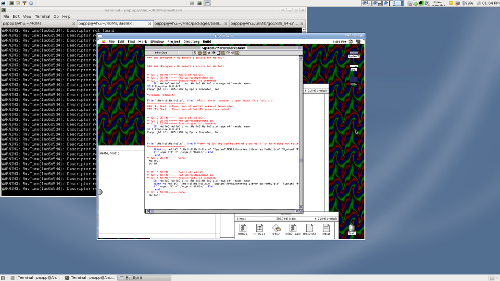
I just set up a BasiliskII disc image with System 7.5.3, MPW, and related goodies. It seemed like fun to have a vintage 68k Mac development environment to play in…
sys7mpw_desktop.png

Posted in Computers, DIY, General, OldBlog | Tagged , , | Leave a comment

T60p Repair

I opened up my old T60p for some repairs the other night, just posting to share what I did now that I’m reasonably certain it worked. The objective of this project was to do something about the relatively high temperatures and annoying buzzing noise coming from the cooling system. This particular machine is on it’s third cooling assembly (the assembly was replaced twice under warranty), and based on comments on from other owners, thermal issues and rattling fans are endemic to the model, mostly thanks to a few poor design decisions.
The surgery:

  • * Oiled (I used BSB Speed Bearings Lube, which is probably Sililcone oil with some adulterants to make it Shear thinning) the fan assembly, basically following msb0b’s guide. The only major deviation is that instead of cutting the aluminized tape, I just used it as a hinge and folded back the jacket. I also note that there is some foam insulation tape on my heatsink assemby, presumably added in later manufactured asssemblies to help with vibrations.
  • * Bent (compound bend) the heatpipe to lower the GPU section about 2mm, as some of the folks in this thread suggest. Basically, I put some thermal paste on the GPU, and bent and reseated until the contact area was appropriate. I was a little afraid bending the heatpipe would harm it (efficiency wise), or crack it from metal fatigue, but nothing was damaged and the contact is better. This is a logical fix- those thermal pads never provide very good conductivity, particularly where they are reasonably thick.
  • * Replaced the CPU thermal compound and GPU thermal pad with Arctic Silver Ceramique (my favorite for almost all thermal-conductivity needs). I left the thermal pad on the north-bridge intact, as there don’t seem to be any major thermal issues with that component, and the pad over it wasn’t damaged.

Based on some cursory tests, the system is running cooler (Both overall and CPU-GPU delta) than it did even with a new cooling assembly. Idle, I’m seeing 43/41c (5-10 degree reduction), and a half-assed “Stress Test” running SupCom for a few minutes only produced temps in the low 80s, with the GPU about 5deg hotter than the CPU– my recollection is that the GPU tended to be in the high 90s under similar conditions, and the CPU in the mid 80s. The big win is on noise; the irritating rattle is gone, and the fan is at most a tiny bit louder than a new one, based on a procedure I should be able to replicate for free.

The wonderful thing about Thinkpads is that they are designed to be mostly user-serviceable (Lenovo cooperatively provides the service manuals as PDFs online, and even allows FRU orders), and they are very common machines, so there are lots of other people playing with them and sharing their experiences, making things like Linux support and after-market mods particularly well explored and documented. Even with the slight design issue, the T60p was a solid machine for 3.5 years, and I far prefer serviceable and working well to being unserviceable and being “slicker… until it dies”. Speaking of vendors of unserviceable hardware, I’m considering setting it up as a hackintosh (at least on one partition) just for fun when I get some time…

Posted in Computers, DIY, General, Objects, OldBlog | Tagged , | Leave a comment