Category Archives: Computers

Bruce Schneier Lecture at UK

To quote the announcement that went out to the mailing lists:
September 17th, 2009 at 5:30p.m
W.T. Young Library Auditorium

“Reconceptualizing Security”
Bruce Schneier
Chief Security Technology Officer, BT.

In a startling change of pace from the usual uninspiring speakers UK tends to bring in, Bruce Schneier, one of the world’s foremost security experts, will be giving a lecture tomorrow night. It sounds like it will be about the perceived security/actual security idea (this is the person who coined the phrase “Security Theater”) he often talks about, and it should should be VERY cool.

I’m definitely going to be there, and there is some talk that it will fill up quickly, so I would suggest showing up early if you plan to come.

Posted in Announcements, Computers, General, OldBlog, School | Tagged | 1 Comment

Haiku!

The Haiku project to reimplement BeOS just released their first alpha, and despite having less than no time to do so, I took a few minutes to play with it, and it is bringing back some great memories. BeOS was a really spectacular operating system which was floating around the edges of the market in the late 90s, with some truly revolutionary features, some of which are still not widely adopted. Remember WinFS, that Microsoft has been failing to deliver since 2003? Be had almost all the amazing indexeng/medatdata/journaling features (basically everything but encryption) in it’s BeFS in 1997. And that “new” Grand Central Dispatch thread model in the most recent version of OS X? BeOS had something analogous from the beginning (around 1995). It was, in many ways, a perfect, highly responsive desktop OS, which (if not for the anticompetitive practices of Apple and Microsoft) could have owned a large portion of the market. Probably my favorite memory of BeOS was running the classic “BeOS is more responsive” demonstration: bringing up dozens of instances of the built in media player, each playing a different mp3, on pathetic (I did it on a Pentium MMX @ 233Mhz with 192Mb of RAM) hardware… and having them all play smoothly and mix together. I’m not sure my current machine could do that under Linux OR Win7, and it is (roughly) ten times as powerful.
This OSNews Article has a good history and perspective; the quick version is that Be, Inc. was formed largely from disenchanted former Apple employees (including Joseph Palmer, an electrical engineer/ industrial designer who I’ve always looked up to), designed themselves a revolutionary platform (hardware and software), moved to a software-only model because they couldn’t afford to maintain their hardware buisness, and were actively pushed out of the market by Apple (who took action to keep BeOS from running on new Macs, and killed the clone business, ruining the market for PPC hardware) and Microsoft (who bullied PC vendors into refusing to bundle BeOS). Before Be imploded, and had their assets bought by Palm, Apple almost bought Be as the core for the “post-classic” Mac after the Copland project failed. Instead they bought NeXT (also made up mostly ex-Apple people) for roughly Be’s asking price, and that eventually became OS X.
Best of luck to the Haiku team, a big part of me hopes that progress will continue, and sometime in the not too distant future my everyday use machine will be a Haiku box.

Posted in Computers, DIY, General, OldBlog | Tagged , | 1 Comment

HDL Testbenches

After three classes (EE281, EE480, EE585) where I should have been taught how to write real, procedural testbenches for my digital circuit simulation instead of clicking in inputs on ISE’s (ISE is the subject of much swearing and hatred) waveform editor, there was a nominal effort to demonstrate it in EE685, and between that example and the Verilog book I bought for my own edification some time ago (It’s an OK book: I’m yet to find a HDL text I really like), I finally managed to get it down. This is important for three reasons: First: NO MORE CLICKING! I can write little procedural blocks to generate counting-order covering inputs, or other arbitrary stimulus. Second: Automatic Testing! For simple modules, I can simply write two logically equivalent but stylistically different versions, and, barring any design-level fuckups, determine that they both work by telling the simulator to compare the two version’s behavior and alert me if they differ. Third (and most signifigantly) it allows me to do my check/test/verify my modules without dealing with ISE. There are a number of free Verilog tools, most significantly Icarus Verilog, a Free (GPL) synthesis/simulation suite which seems to be well liked (and builds and installs easily on my machine), which allow me to have a whole toolchain without the hassle of maintaining my own ISE installation, or putting up with the glacially slow (despite being very, very powerful; bad configuration) lab machines for longer than is required to generate a test run to turn in for class.
Icarus looks to be an interesting challenge; it definitely doesn’t go out of it’s way to be user friendly, it requires an external tool like GTKWave to display waveforms, and it’s got some features and switches that I’m not even sure what are for, but it is documented and seems to be quite reasonable.
One feature Icarus doesn’t (AFIK) have is the ability to synthesize to the various programmable chips (which are all very, very proprietary). I do have my own FPGA board, which I got in a burst of excitement after first being exposed to FPGAs, and have never had a chance to play with as much as I’d like. Somewhere deep, deep down on the list of projects is to get a decent programming cable for it (my current one is an old parallel model), and spend some quality time playing around with it, I clearly wouldn’t be alone.

Posted in Computers, DIY, Electronics, General, OldBlog | Leave a comment

Ada

The latest weird obsolete piece of technology I’ve decided I enjoy is the Ada programming language, an older imperative language, developed at the request of the Department of Defense in the late 70s, and named after Augusta Ada King, Countess of Lovelace. The CS655 text Advanced Programming Language Design uses Ada-like syntax for its examples, so I invested a few minutes in reading some of the Ada Spec while working the first homework: its really a pretty cool language, especially the concurrency features that are actually integral to the language instead of half-baked in after the fact now that we’re rubbing up against the limits of single-thread CPU designs, and various compile-time and runtime self-checking features.

I’ve been exposed to an Ada-like language once before; VHDL, with which I’m fairly familiar, is derived from Ada’s syntax in the same way Verilog is derived from C. The advantages aren’t so obvious there; Verilog has a lot of the more idiomatic behavior cleaned out…and you can tear Verilog’s amazing array slicing features from my cold, dead hands.

I’m coming to appreciate that there are two distinct design philosophies in computing; incidental, haphazard, and/or organically grown designs which tend to become extremely quirky over time (ex: C, LaTeX, both of which I love dearly, largely for their quirks), which I will call “idiomatic designs” (the phrase is occasionally used elsewhere, not always for the same thing), and painstaking, careful “intentional designs” like Ada and that tend to be kind of unwieldy in real world applications. Unlike a lot of intentionally designed technologies, which tend to exhibit design-by-committee syndrome, the objection to Ada seems to be more because there was an attempt by the Department of Defense to mandate Ada for defense projects before it was fully mature, which bred considerable resentment, rather than any deficiencies in the language itself. I suspect Ada might actually make a comeback as a result of the elegant concurrency support, unless there is a miracle breakthrough in automatically parallelizing compilers in the near future. (I’d bet on the lack of usable generalized parallel programming models being the next big issue in computing.)

Probably more interesting than the dichotomy is the fact the organic approach is winning in most sectors. A lot. C and it’s various descendants are going strong; Ada is almost a dead language. UNIX is spreading; VMS is dying out.
In general, it seems like Idiomatic designs are idiomatic to suit themselves to what people actually use and enjoy using, even when they don’t objectively make sense.
Clearly I’m already learning useful things from CS655.
Side note: the best resource on C weirdness ever. It will hurt your head.

Posted in Computers, General, OldBlog | Tagged | 1 Comment

LLVM FTW

I’ve settled the direction for the next step in my master’s project this summer: I will be using the LLVM Compiler Infrastructure as the backbone of my LARs compiler.
The decision to work with an existing compiler rather than going off and writing tools from scratch carries some pretty significant advantages. The biggest is that some of the dark corners of the C specification make writing a complete, useful C fronted a very, very daunting task, so in order to not be compiling a “toy” language (or cheating with CIL or something) it is nearly the only choice(C, or C-like, is the obvious and preferred choice for input language, but pretty much all languages have similar concerns). Using an existing compiler also saves writing a whole bunch of ancillary code: in addition to the fronted, features for manipulating DAGs and performing optimizations and such are all there to be used and modified. Unfortunately, using LLVM also binds me to some design decisions made by other LLVM developers, and potentially exposes me to upstream weirdness. Thus far, I have found no serious cases of either, but suspect later in the process some interesting thorns will appear in my side as I more fully understand LLVM’s innards.
LLVM is a compiler infrastructure, rather than merely a complier because of it’s modular design. This modular design is also what makes it most attractive (among existing free, open source compilers) for my purposes, for a huge variety of reasons. The three big ones are:
First, the modular codebase helps with accessability. In many traditional full-scale compilers, the learning curve is nearly unsurmountable. In particular, the dominant free open source compiler suite, GCC, has a learning period measured in months or years before one can make substantial modifications, and requires mathematical concepts like the delta function to accurately express the learning curve.
Secondly, modularity allows me to, in a relatively straightforward way, drop in a new back end that emits code suitable for (but not complete, it’s going to take one HELL of a fancy assembler to be useful) for the proposed LARs design.
Third, the modularity extends unusually high into the structure of LLVM, which allows me to simply turn off, replace, or modify optimizations and features which are inappropriate for an architecture with LARs’ peculiar features.
My start on applying the (fairly thorough) manual for porting LLVM to a new architecture has already shaken out some new ambiguities, concerns, and omissions (some intentional) in the LARs design. This has lead to several sessions on one of the more exciting (in my twisted mind) parts of working with compilers and architectures: making and studying high-level decisions that affect both the hardware and software in a system, in potentially complex ways. Onward to more exciting adventures in computing and academia!

Posted in Announcements, Computers, General, OldBlog, School | Tagged | Leave a comment

Cybernetics and the Technological Singularity

Over the last few weeks I’ve seen a remarkable amount of news about cybernetics, and I haven’t been actively looking. The first piece was about a removable replacement eyeball installed in a blind man. The eye is not entirely functional, but does allow for partial (low resolution, spotty, grayscale) sight by interfacing an external camera to an artificial retina. Serious Brain-Computer interfaces like the synthetic retina have been appearing for about a decade, ranging from mostly useless, totally noninvasive devices like the various headband products sold as novelties to life-changing technology like the above.

A one-eyed filmmaker also had a bionic eye implanted. This one isn’t for the wearer’s benefit; it allows for wireless recording to provide a literal view through his eyes. The camera mechanism itself is internal and looks as natural as any prosthetic, allowing the wearer to interact as though he were not wielding a camera.

For the scifi dorks, in the latter episodes of Bayblon 5, G’kar had an eye which worked like the sum of the above; it was removable and wireless, but he was also able to see through it. It seems like that is the real yearning behind both projects; restorative, wireless, and shareable.

The next article I came across was in last month’s IEEE Spectrum, an article on the state of prosthetic arms (apologies if it tries to paywall you, for an organization for technology professionals, IEEE’s web presence is full of suck and fail), written by an engineer who lost his lower arm in Iraq, and was so disappointed by the selection of products on the market he joined the (DARPA-funded) efforts to develop next generation systems. He notes that the market for prosthetics is commercially unattractive, as there is only a minuscule need for any particular part, and suggests the remedy is open standards (for how the various prosthetic parts attach and communicate), and crossover technologies co-developed for mass market segments, such as interfaces with HCI (he says “video game controllers”, which I find horrifyingly disingenuous) and mechanical parts with robotics.

The last encounter was also about prosthetic limbs; (another) TED talk by Aimee Mullins a multi-talented woman who is missing her legs below the knee and uses a variety of prosthetics to adjust her appearance and abilities. The interesting part isn’t the particulars of the legs; it’s the way she and others perceive the legs. I’m going to go ahead and verbatim quote the end of Mullin’s talk, because it sums up the idea at least as eloquently as I could:

The conversation with society has changed profoundly in this last decade. It’s no longer a conversation about overcoming deficiency, it’s a conversation about augmentation; potential. A prosthetic limb doesn’t represent the need to replace loss anymore. It can stand as a symbol that the wearer has the power to create whatever it is that they want to create in that space. So, people that society once considered to be disabled can now become architects of new identities and indeed continue to change those identities by designing their bodies from a place of empowerment.

And, what is exciting to me, so much, right now, is that by combining cutting edge technology (robotics, bionics, etc.) with the age old poetry, we are moving closer to understanding our collective humanity. I think that if we want to discover the full potential of our humanity, we need to celebrate those heartbreaking strengths and those glorious disabilities that we all have. I think of Shakespeare’s Shylock: “If you prick us, do we not bleed, and if you tickle us, do we not laugh.”

What this all naturally leads to, at least for me, is my beliefs about the technological singularity. People usually consider that it will happen in one of two ways, artificial intelligence will surpass human capability (Strong AI), or people will be augmented beyond their current capabilities (Transhumanism, usually via technological augmentation (like this, another TED talk from people at the Media Lab, this one about awesome wearable augmented reality gear)). I believe firmly in the latter; we’re not going to build a better intelligence by trying, usually poorly, to replicate a human in devices which are poorly suited to the job. We can however build devices which are better suited to particular tasks than humans, and, if the interfaces between humans and these devices can be made adequately transparent, use them to augment human(?) capability far beyond current limitations.
My other big thought on the matter is that the singularity won’t be a quantum leap, and isn’t going to be something we know when happens; humans won’t be the top dog Monday night and superseded Tuesday morning; it will be something our augmented “superhuman” progeny look back and try to find a moment to assign as the turning point, just like every other incremental, iterative improvement in technology which has resulted in a leap in society as it permeated into our lives.

Posted in Computers, General, OldBlog | Tagged | Leave a comment

Retro Computing

I saw retr0bright, a hobbyist produced restorer for antique plastics go by on the geek newses(first via /.) today. It probably does do a little bit of damage to the plastics when used, but I doubt it’s much worse than another year of aging. I love antique computing tech, and this provides a flimsy excuse to ramble about it a bit instead of working on all the things I should be.

I’m specifically interested in retr0bright for restoring the plastics on the Mac SE I yardsaled some years ago. I picked it up partly out of waning to poke around in a one-piece Mac, and partly because the case information indicates it is +/- a few months of my age, which makes it a nifty conversation piece. The machine is a fun project box as well; Mac SEs have bays for two drives, either two floppy drives or a floppy and a hard drive, I mounted a small spare SCSI hard drive into the internal frame with a little bit of EM shielding, and kept both floppies. Having grown up on Macs (the formative computer for me was a Macintosh Centris 660AV running OS 7.1. The machine is still in my parent’s attic, but I’m fairly certain its video board has died. The SE is sitting on a shelf in my old room in my parent’s house, and when last I tried it was still fully functioning. People who knew me in middle and high school will remember that one side of my room was covered in a selection of aging Apple hardware, it was a big part in making me the hacker I am today.

I am mostly unimpressed by modern Macs (although I wouldn’t mind a Mac or a hackintosh to play with), but still sometimes pine for awesome old mac software; this is what Basilisk][ is for. Coupled with an appropriate ROM image and disc or disc image (both of which I keep around), Basilisk][ can emulate a 68k mac on a Windows, Linux, OS X (and possibly others) host. This lets me reminisce, and play with old software from my childhood without having to bust out any finicky old hardware. A lot of the things I keep on the drive image are games I remember from childhood, especially a couple of old Ambrosia software titles like Barrack (a particularly awesome jezzball-like game) and the first two titles in the Escape Velocity series (which are perfect non-classical RPGs). I also keep a copy of Word 5.1, which is in some ways still the best thing Microsoft ever made, and some other productivity titles from the time. It’s always neat to see what changes and what stays the same.

In the same vein as Basilisk ][, one of my other formative experiences in geekry was learning about emulation, staring with the Super Nintendo and snes9x. The joy of “You can play all those awesome old games on your computer” has always been an almost irresistible motivator, both for myself and for passing on to others. Emulation also provides a great outlet for compulsive behavior for lots of people, especially when you start to look into the world of ROM collectors (ROM in this case refers to software copies of games, which were traditionally stored on ROMs). My interest in emulation waxes and wanes, but I always keep at least a distant eye on the scene, and have always sort of wanted a MAME Cabinet (a standup arcade cabinet with a computer that runs MAME to allow it to be all arcade games in one. Maybe now with the hacker space I can interest some others in putting one together, so that I don’t end up with a full-sized standup arcade cabinet that I have to worry about moving around with me, but can still build and play with one.

While talking about retro tech, it’s important to mention the other computer really important to my geek development the Winbook XL my parents bought me when I started middle school. It is a bog-standard, if slightly cankerous, Pentium MMX laptop (intel chipset, yamaha OPL3 sound, Chips&Tech graphics, etc.) with an awful, awful 12.1” passive matrix LCD. The machine was my first serious experience with windows, with hardware and software upgrades, with system administration, and, most importantly, with Linux. My first distro was SuSE 7.2, I then bounced around for a while, briefly settling on Slackware, and eventually finding my way to Arch, which has been my primary OS for years. As for the machine itself, some of the port covers fell off in its first few years, and the hinges failed after about 5 years. A few months ago the backlight(or backlight transformer) gave out… but the bulk of the machine still works, and has BeOS (a wonderful, beautiful OS that is a perfect example of computing that could have been) and Debian systems on it. I get it out from time to time when I need another beater box to try something on.

Obviously computer history is something I love, from the truly early stuff, (Babbage, Lovelace) and even more the World War 2 era (Mauchly, Eckert, Aiken, Von Neumenn, Turing, Zuse…) into the 70s, 80s and 90s when computing technology really began to permeate the world. The best book I know of on the topic is A History of Computing Technology, 2nd Edition, if anyone knows of something better, especially for more modern stuff, please tell me.
Posted in Computers, DIY, General, Navel Gazing, Objects, OldBlog | 1 Comment

USBTinyISP

I got my Adafruit USBTinyISP AVR programmer/SPI Interface/USB Bitbang Device kit today, and was compelled to immediately assemble and test it. The USBTinyISP is an excellent product; it is considerably cheaper than the official Atmel AVR programmer, just as functional, and supports a fellow qualified hobbyist. I’ve been meaning to pick up my own AVR programmer for a while, as having a programmer and a stock of cheap microcontrollers (I also recently picked up half a dozen adorable ATTiny13 chips to use with it to give my SmartLEDs idea a shot) enables all kinds of cool projects, that do not involve “find one of the programmers on campus” or “Use the department’s Arduino Dieciemilia that I haven’t returned.”
The USBTinyISP comes as a very nice kit, which includes all the component parts including a nice case and well-made PCB.
usbtinyispparts_small.jpg
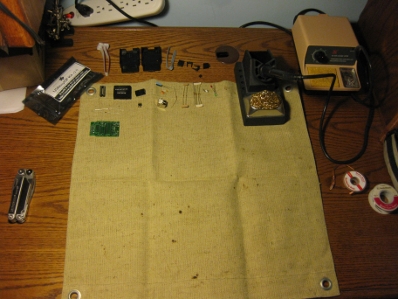
In the picture, in addition to the included parts, you can see my trusty Xytronic 379 Soldering Station, for which I have nothing but praise (if you think you need one of those classic blue Weller WES51 stations, you really need one of these, its a better station and costs half as much). In the left of the frame you can see my Leatherman Wave, which I cooed about a few days ago. It just happened to be in the picture, I use an ancient pair of thin-profile pliers (now sold as the Xcelite 378, highly, highly recommended) I inherited from my mother when I am working on electronics at home.
usbtinyispalmostdone_small.JPG
I consider myself reasonably competent with a soldering iron, and it took me a little under an hour to go from holding a mailer pouch to programming a chip, with no fuckups in between, which speaks well for the quality of the instructions, the kit, and the thinking that went into them. There are a few interesting quirks in the design; several resistors mount vertically to the PCB, the large electrolytic capacitor is intentionally mounted so it rests on top of the TTL buffer. These are both space-saving measures, and anyone who has ever seen most of the things I throw together on perfboard knows I have a high esteem for nifty tight designs.
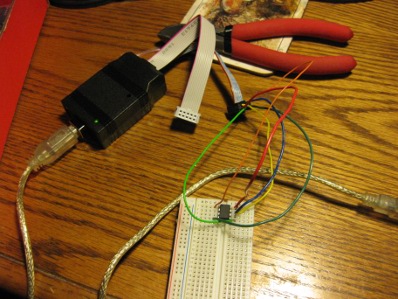
Using the completed programmer is just the same as all the other models of AVR programmer. For software I use AVRDude, since it is well-supported on all common platforms. Below is a shot of my first successful program (or actually, readout) of a chip.
attiny13prog_small.JPG
(closeup)
attiny13bread_small.jpg
That tiny black thing on the breadboard surrounded by the brightly colored wires is one of the aforementioned ATTiny13 chips; I paid $1.95ea for those, and it really is an entirely capable little microcontroller. The incessant march of technological progress never ceases to amaze me. Sometime soon I’ll need to make a little target board that can socket the ATTiny13s and has a plug for the 6-pin connector so I don’t have to muck about with loose wires every time.

Posted in Computers, DIY, Electronics, General, Objects, OldBlog | 1 Comment

Design

I’ve been reading a lot of things about design of late: Donald Norman’s classic The Design of Everyday Things, Jef Raskin’s (disappointing) treatise on User Interface design The Humane Interface, copies of Dwell my mother passes to me when she finishes with them. In my Cognitive Sciences course, I think of many of the topics we discuss through the lens of a designer.
I came across Dieter Rams’ Ten Commandments on Design again today. All the babbling blowhards have managed to produce with their cognitive models and quantitative approaches (which I am usually all for) is summed up neatly in these ten statements.

Good design is innovative.
It does not copy existing product forms, nor does it produce any kind of novelty just for the sake of it. The essence of innovation must be clearly seen in all of a product’s functions. Current technological development keeps offering new chances for innovative solutions.

Good design makes a product useful.
The product is bought or used in order to be used. It must serve a defined purpose — in both primary and additional functions. The most important task of design is to optimize the utility of a product’s usability.

Good design is aesthetic.
The aesthetic quality of a product is integral to its usefulness because products we use every day affect our well-being. But only well-executed objects can be beautiful.

Good design helps us to understand a product.
It clarifies the product’s structure. Better still, it can make the product talk. At best, it is self-explanatory.

Good design is unobtrusive.
Products fulfilling a purpose are like tools. They are neither decorative objects nor works of art. Their design should therefore be both neutral and restrained, to leave room for the user’s self-expression.

Good design is honest.
It does not make a product more innovative, powerful or valuable than it normally is. It does not attempt to manipulate the consumer with promises that cannot be kept.

Good design has longevity.
It does not follow trends that become outdated after a short time. Well designed products differ significantly from short-lived trivial products in today’s throwaway society.

Good design is consequent to the last detail.
Nothing must be arbitrary. Thoroughness and accuracy in the design process shows respect toward the user.

Good design is concerned with the environment.
Design must make contributions toward a stable environment and sensible raw material situation. This does not only include actual pollution, but also visual pollution and destruction of our environment.

Good design is as little design as possible.
Less is better — because it concentrates on the essential aspects and the products are not burdened with non-essentials. Back to purity, back to simplicity!

(I find I like it better with the selectively bolded words, that was my doing). I would really like to know when and where these were originally published.

Posted in Computers, DIY, Electronics, General, Literature, OldBlog | Tagged , | Leave a comment