Category Archives: Objects

Coffee Paraphernalia

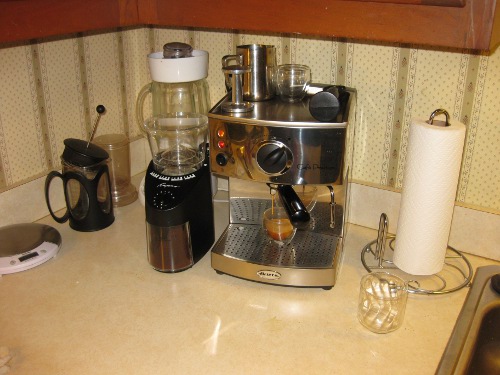
Espresso is unfortunately one of those holy grail hobbies. Once you start making your own, you will forever be trying to make “The Shot;” a perfect, sweet, rich, tiger-striped shot of coffee that manages to be life affirming in only 1.5 ounces. I once managed to get a near-perfect shot out of a former housemate’s comparable setup on a fluke, and it got me hooked. In that interest I just picked up a conical burr grinder, which is the last piece of coffee paraphernalia required for a proper coffee-dork setup. This brings my coffee paraphernalia up to a little over $300, for the following:
coffeepara.jpg

Pictured:
Lello Ariete 1375 Espresso Machine – Not a great machine by any stretch of the imagination, but very nice for $200. It has a chromed brass portafilter, mostly metallic construction, a thermoblock heater, and a pump that can (at least in theory) generate 15 bars of pressure. I still can’t get a perfect shot out of it (barely 20 second extractions, and they start to show some bitterness at even that), but it has only had one (easily cleared) failure in 10 months of use, and even my sleep-addled brain can get a shot better than what Starbucks serves out of it every morning. I’m hoping I’ll be able to get longer, more consistent shots by adjusting the grind now that I can get instant feedback on small batches. My only complaints on the machine are related to the steamer wand sometimes being a little slow to pick up (sprays hot water before steaming, but works very well with good technique once it gets going), the system dripping out the portafilter after the machine has been used, and the drip tray corroding easily and/or not catching liquid from internal venting.

* New Addition: Jura Capresso Infinity 560 Conical Burr Grinder – I used to not believe in the “good grinder is as important as a good machine” mantra, but after fiddling with some friend’s grinders in the past, and noticing tangible degradation of shot quality over the course of a pound of ground coffee, I’m now a believer. I’ve only put a couple ounces of coffee through the new grinder, and only at one setting, but it made nice, even, cool grounds, with virtually no flaking. The only things I’m not terribly pleased with are the cleaning procedure between different beans (it retains a lot of grounds inside the workings), and the amount of static it generates in the catch basket. My sentiments seem to be matched in other reviews as well.

* RSVP Terry Tamper – A perfectly usable, well regarded metal tamper, way, way, way better than the horrible scoop-end plastic ones. Mine had some nasty cast lines, which I have ground off the edges of 49mm end with hand files; it still sometimes pushes some grounds over the edge of the basket, but its a lot cheaper than equally regarded alternatives, and I’m sure I’ll eventually get it stoned smooth.

* Bodum Pavina 2oz glasses – These things are way more expensive than necessary, but they are so cool. Double walled, single blown glass, so the contents look like a 3-d parabola floating in space. One of mine has a hairline crack from “rough handling” in the dish rack, but I’ve been continuing to use it anyway, and it doesn’t seem to be spreading.

* Some unremarkable small steel frothing pitcher, and the included measuring scoops, cleaning brushes, etc. from the various components.

The Bodum French Press in the picture belongs to one of the housemates; we also have a drip maker tucked away somewhere, but it didn’t get used enough to justify its counter space with the better options on hand. The sharp eyed caffeine junkie will also spot an ingenuitea in the picture; that corner has become our little altar to caffeination.

All told, my setup costs less than a typical “nice” espresso machine (this is just a hair over minimum cost of entry for real espresso setups, they head off toward infinity at an alarming rate), and, with good technique, is capable of producing drinks at least on par with most of the local coffee houses, so it is a success.

Posted in FoodBlogging, General, Objects, OldBlog | 4 Comments

Chromium

I downloaded Chromium (google chrome, but purely FOSS, so there is a build that can be grabbed directly from the Arch repos) to play with this weekend, and it is way more promising than last time I played with it. In particular, I wanted to see if the touted speed benefits were real, and see if there was a viable alternative after the massive UI (”Open in new tab” is a critical feature for tabbed browsers…), resource consumption, and stability regressions in Epiphany after it’s switch from Gecko to WebKit.

I should note that my browser usage is a little weird; I keep one Firefox window per topic (usually 3-4) on my first virtual desktop, plus an instance of Epiphany on the second virtual desktop, which is used for mail (it stays logged in to my google account, Firefox doesn’t), banking and various other things I’d rather not have logged in alongside my normal browsing, or brought down when I manage to crash Firefox.

As for Chromium itself (I’m using “Chrome” and “Chromium” interchangeably here):

The good:
* Fast. Very, very fast. Especially javascript, which is it’s claim to fame.
* Responsive. The UI is WAY more responsive than Firefox, I’m yet to have a “did that work?” moment with it.
* The default new tab behavior that places text entered to a new tab into a google search is correct as far as I’m concerned, I’ve had Firefox set up that way for ages.
* Per-tab processes to prevent broken pages from taking down the browser.
* Extensions in separate processes. This is probably the best feature, Flash crashes all the time on my machines, and I hate having to restart Firefox to get it back.
* Incognito windows. This is a partial solution to the logged in/not logged in issue that makes me keep two browsers up.
* Perfect default tab opening behavior; tabs created from “Open link in new tab” open next to the parent tab, tabs created by ^+T open at the end of the bar. I’ve never managed to make that work consistently right in Firefox, despite having a nice extension to do so.

The bad:
* That “innovative” UI that doesn’t integrate with the desktop theme, and gets clumsy when you turn on the “Use System Title Bar and Borders” option in the vain hope that it will help.
* That same “innovative” UI that puts the tabs in that awkward fitts-law worst case scenario place close enough to the edge of the screen to require long travel, but not close enough to get edge benefits. I am not alone in this opinion, would it really be so bad to add an option to fix that?
* No scrolling tab bar. I usually have several windows with <20 tabs each, but if I spawn tabs for all the interesting unread threads in a forum or somesuch, I really like to be able to read the titles.
* Ravenous memory and cycle consumption: if you think Firefox is bad about consuming resources, just wait until you see Chrome. Then again, the latest builds of Epiphany have a nasty habit of bugging out taking up some CPU time constantly, and Chrome is way better than that.
* Awkward bookmark-group behavior. There is a “open all in new window” feature (which is very cool), but it extends to sub-folders (which is not).

Overall, it is definitely my new second-choice browser, and I’ll keep it installed to use when I have problems with Firefox. I might even switch despite the UI issues; some of the above features are really nice, and adblock works just as well with chrome (this is very important for my primary browser). It should be neat seeing the next few versions of Chrome and Firefox, real competition (sorry IE and Opera, you don’t really count) is a wonderful thing.

EDIT: Apparently adblock doesn’t work quite as well in Chrome, Firefox adblock actually prevents ad material from downloading, Chrome adblock simply prevents it from rendering. Not an issue with a fast connection and fast machine, but you might want to go ahead and fix your hosts file to get rid of the more egregious offenders anyway.

Posted in Computers, General, Objects, OldBlog | Tagged , , , | Leave a comment

Kentucky Touch screen / Natural User Interface meeting

Earlier tonight I attended a sort of open-access seminar on multi-touch user interfaces, catalyzed by an EE senior design group working with Awesome Inc. to create a large multi-touch wall for the outside of their space. The attendece was wonderfully diverse on account of the announcement hitting the professional, academic, and hobbyist communities in Lexington (more events need to propagate like that!). Attendees included several members from the Lexington IEEE chapter (co-opted as a chapter meeting), a number of local creative types, many students from UK, and several other interesting folks.

The discussion centered around the CCV effort of the NUI group, and was fairly solid, although I would have appreciated a bit more technical depth. I actually ended up dominating a couple conversations on account of being better read in the area than most of the other attendees, and don’t consider myself particularly well-versed in multi-touch display technology. I still don’t really understand TUIO, I was rather hoping someone there would be able to explain it.

One small downside, I still get the uncomfortable feeling that everything said or done at Awesome is being sucked in and analyzed as a potential source of financial gain. The culture there always seems exploitative (or at the very least commercial) instead of communal, which is very unfortunate, as they have set up a nice space, and seem to be attracting interesting events.

I really am attracted to open-access, discussion based topic seminars like this, and would love to see more of them happen. There are lots of good efforts to bring that sort of thing to Lexington, from a seminar series Dr. Finkel is attempting to arrange this semester (based on students and faculty giving short presentations on neat things they have found), to Collexion and Dorkbot’s regular meetings. This is not the first time I’ve been after this sort of thing either, for a while the UK LUG was running some decent events in this vein, in particular I remember a successful LUG event on PyGTK, but the LUG is several years defunct…again…because those of us who were active didn’t have time to keep it going on our on (and be students), and no one else stepped up. I think some of the short-form lecture series like ignite have had events here as well, but those have never seemed as useful to me.

Posted in Computers, DIY, Electronics, General, Objects, OldBlog | 1 Comment

A Tiny Plastic Dot

(This is very much an example of one of the little manic episodes that make me a good generalist/appear high functioning)
The left touchpad button on my laptop (Thinkpad T60p, hostname Monolith) has been “limp” for a while. It bothers other people who use my machine, because (objectively) it really does feel very wrong, but it had broken gradually and I had acclimated enough that it didn’t bother me. Last night I started paying attention to the problem, and it became maddening, so I decided to see if I could fix it. I looked at the problem last time I had the machine apart, so I knew there was a torn plastic tactile dome to blame. It is (as best as I can make out) impossible to order just the appropriate domes, and a whole new touchpad is 1. defeatist, 2. about $12 from shady ebay sellers, and 3. requires waiting for it to be shipped. I decided a better (ie. creative, free, immediate, and credit-card-fraud free) solution would be to go rummage in the parts bins, find a sufficiently similar tactile dome in something dead, and install it. The closest match I could find was the keyboard domes from the corpse of my old VPR Matrix 180B5 (The worst made laptop I have ever encountered. Every bit as fragile as one would expect something made by a Best Buy house brand to be, even though it was basically a re-badged Samsung P10. Polystyrene is not chassis material.) I now have a partial match (it’s a little too weak, and not “snappy” enough) installed, which is good enough to keep it from being bothersome.
Thinking about tactile domes reminded me of a fabulous article I read (I thought) about them several years ago. It turns out it was a much more general article about handheld devices, but it really was fabulous. The article is “Handhelds of Tomorrow” from the April 2002 issue of Technology Review. Ideo has a PDF available outside a paywall. The part about the tactile bubbles was one little subsection about Peter Skillman, who was “the hardware guy” at palm/handspring (weird corporate history).
The search for the article reminded me of a previous kick on the work of one of the other important palm/handspring people, Jeff Hawkins, who in addition to being a founder of both companies, is doing amazing work in neuroscience as it relates to computing, and has written a book On Intelligence and given a awesome TED talk on the topic.
Hurrah for (hypo)manic episodes?

Posted in Computers, DIY, General, Objects, OldBlog | Tagged , | Leave a comment

Pionier Button Hacking: Step 1

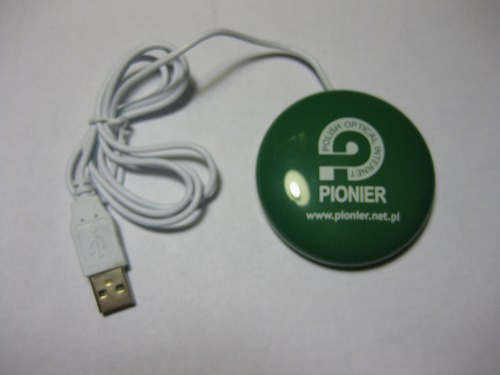
pionierbutton_sm.jpg

(eventually I’m going to have to hack up a light tent (for the glare) and camera mount(for the jitter) for this kind of thing, but it hardly seems necessary with my little point-and-shoot)
One of the more promising bits of schwag at SC09 was a little USB button thing handed out by Pionier. The basic premise on the button is that after connecting it to a computer via USB, it lights up with enticing shifting colors, and, when pressed, sends the computer to the pionier SC09 website. It does this by announcing itself as a USB HID device, emulating a keyboard, and typing “{control}rhttp://www.pionier.net.pl/webstarter/09scpo6r8q {newline}”, which will have the desired effect… from the desktop on a windows box. After seeing what it did on a laptop on the show floor, I grabbed a few extras thinking they would be fun to hack.

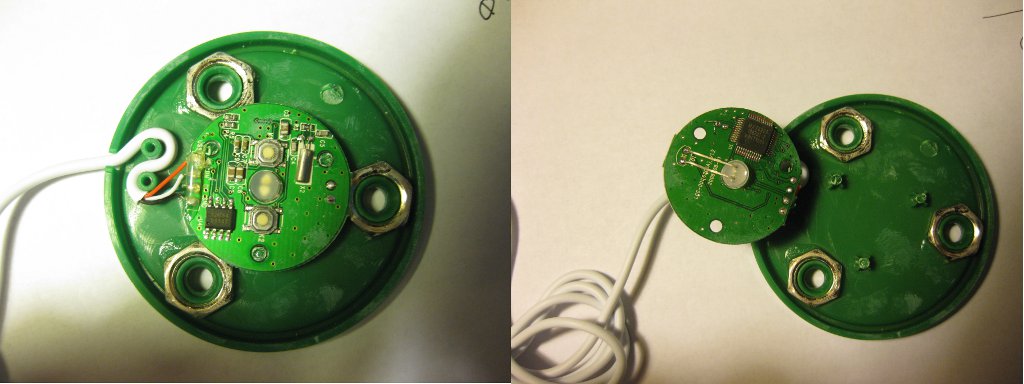
I pulled apart one of the buttons to read off what the chips are, and things look promising. (larger image linked)

pionierbuttonteardown_sm.jpg

The board is based around a MXT8208 USB 2.0 Flash Disk Controller (datasheet). The chip consists of a 80c51 microcontroller with hardware USB 2.0 PHY, I2C, a general purpose UART, some dedicated flash management features, and 28 GPIO pins (mostly overlapped with other functions) in a LQFP48 package. This means it SHOULD be susceptible to much better hacks than simply changing the output string; with a little luck it will be convertible into a darling little intermediary device for attaching projects to a computer via USB by serial or PIO. Since there is no flash chip hooked up, the majority of the GPIO pins are free, making it especially suitable for that kind of repurposing. By far the primary use for this chip is making little USB flash drives (and, based on the information around the ‘net, this one is particularly favored in making “fakes” that misreport their capacity, because it is more programmable than many of it’s competitors), but, assuming I am interpreting the chinglish datasheet correctly, the non-memory USB widget use case here is intended as well. Matching the suggestion in the datasheet, the software for the button behavior is (apparently) on a K24C64 64kbit Two-wire EEPROM (Datasheet) mounted on the other side of the board.

The other components aren’t terribly interesting: a pair of SMT push buttons, a 12Mhz crystal, 6 assorted SMT capacitors, 3 assorted SMT resistors, and a 2-lead RGB color phasing LED(unfortunately, 2 leads means it probably can’t have it’s behavior altered beyond on/off).

Software wise, it reports VID=0×2000, PID=0xbeba, which seems to be a made up ID written to the chip in software. There is a UdTools utility offered up by micov (after a little bit of google translate-foo), but it only seems to be able to tweak the flash-specific functions, not perform general reprogramming. This IS promising, as it implies everything should be writable from a host computer, rather than having to pull the EEPROM and program it separately to alter the behavior, but I haven’t figured out how to do so yet.

Any ideas? Usage wise or tools wise?

Posted in DIY, Electronics, General, Objects, OldBlog | 2 Comments

SC09 Schwag Review

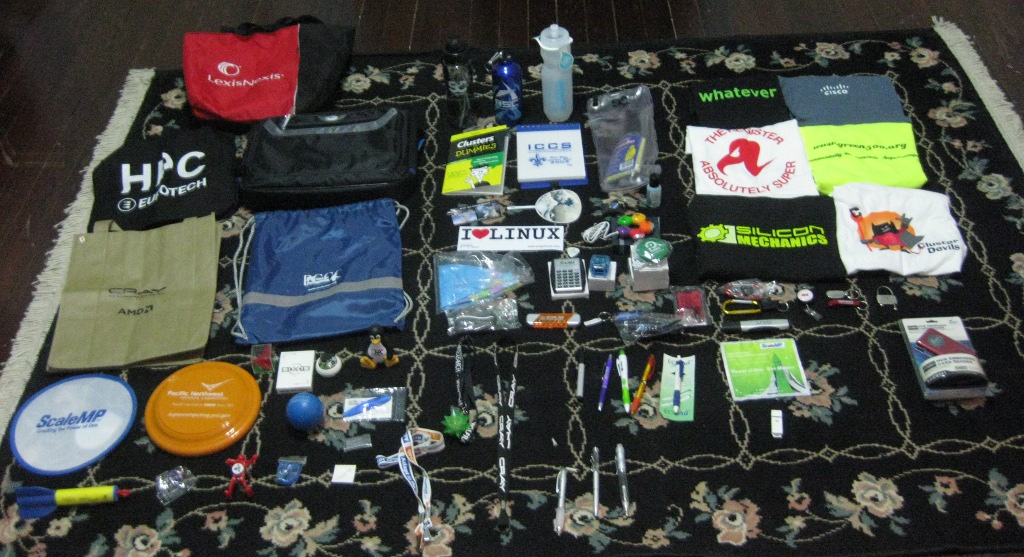
schwag_sm.jpg
(Larger image linked)
Now that the end-of semester panic is over, time to get to other important* things. Like sorting out my schwag haul from SC09. The food products were previously removed and consumed and/or disposed of, based on how likely they were to poison me. Some superlatives:
* Best T-Shirt: Silicon Mechanics (this one was close, Cisco has better fabric, Platform Computing has a clever slogan, and Green500.org is a XXXL made of the most garish jersey fabric I’ve ever seen)
* Best Tool-Thing: Juniper Networks screwdriver/light/level thing
– Runner up: CHREC lighted eyeglass screwdriver
– Runner up: Arctic Region Supercomputing Center rechargeable chemical hand warmer
* Best Toy: NCHC Solar Powered Car
* Best Bag: SC09 Conference bag (nice padded laptop affair)
– Runner up: Giant LexisNexis tote (that I should probably put in the microwave to get rid of the tracking devices in…)
* Best Electronic Gadget: ??? (possibly Sure Star computer) powered USB Hub/Cardreader (seriously, this thing is nicer than the one I’ve been using.)
– Runner up: YMI 2GB flash drive
* Most Hackable Schwag: PIONIER button (button with a USB cable; emulates a keyboard and types their URL when pressed. Want to hack and replace the action.)
* Best Lanyard: Cray (this thing is seriously slick, all the other lanyards sucked)
* Best Pun: OpenGear Aluminum bottle opener
* Best Pen – BlueArc blue LED pen(was going to go to FusionIO with it’s light-up gel grip, but it broke the first time I fiddled with it)
* Best LED Object – Instrumental conductivity-sensitive LED “Ice” Cube
– Runner up: NASA flashing LED badge

I wasn’t really actively schwag collecting; these are just what I got making a loose circuit of the show floor.
*This is totally unimportant.

Posted in General, Objects, OldBlog | Leave a comment

SC09 Booth Hacks

sc09booth1.jpg
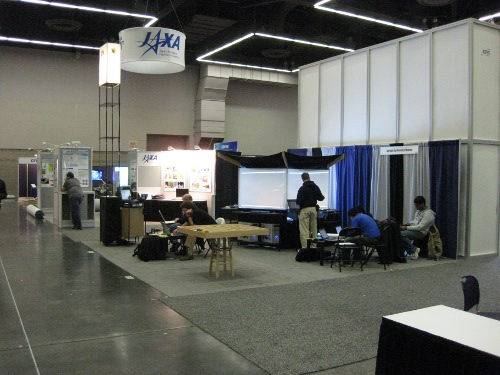
The aggregate.org booth is cheap. Really cheap. So cheap that most of the major vendors have single pieces of hardware that cost more than our entire booth. But we still looks classier than all but a handful of the booths on the exhibit floor. This is because we were clever. Where other exhibitors have 42”+ LCD screens, we have large swaths of plasticized paper, wrapped around a modular shelving frame, and rear-projected to by a bunch of old XGA projectors. Because all displays have black backgrounds, we have what is visually four, four foot diagonal displays with no edges. For less total cost than a single 50” LCD. The group has been using a rig like this for years.

I’ve already written about the sign tower. It’s now complete, and is the kind of object that other people use as a beacon to navigate the show floor. It is also the mount for our previously mentioned slow update skycam.
printondemand.jpg
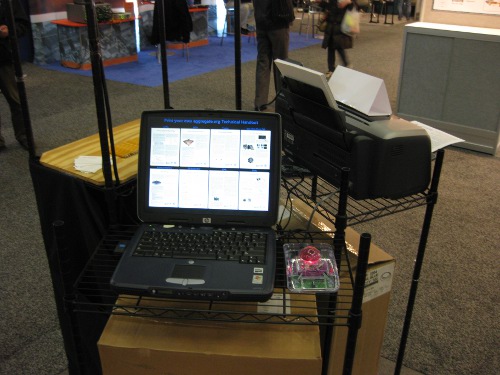
A new clever widget of ours is the on-demand handout printing system. We new we wanted on-demand printing, so we brought a printer, a big lighted trackball, and an extra (decade old) laptop. Over the course of the morning, I assembled an intentional-, professional-looking setup. Originally, I was envisioning a simple, full screen, GTK application, but setting up one-click printing in GTK is a pest, so I came up with a much, much better hack (erm…solution): HTML. I made a simple HTML page, with a table of captioned 300px wide thumbnails of the technical handouts, linked to the real PDF files. I then abused the Firefox settings on the laptop, so that the default automatic handler for PDF files is… lpr. One click, and the requested file is automagically printed, in a separate background process, with the queue managed transparently by CUPS. Set Firefox to full-screen display, and, with a little bit of styling, instant classy interactive on-demand printing interface, that isn’t an obvious hack job. Based on opening night, the slow printer is having a little trouble keeping up with demand, but so long as we keep a reasonable buffer, the system is really nice, and the slight delays it produces have repeatedly given visitors a chance to latch on to one of our other projects.

Thus far, definitely a fun conference, with lots of neat things to do. Also a really, really large conference; the woman at the checkin desk at our hotel said the conference took up about 6,000 rooms,and the idea of 11,000 or 12,00 attendees isn’t incongruous.

Posted in Computers, DIY, General, Objects, OldBlog, School | Tagged , | Leave a comment

Bags with Soul

backpack_sm.jpg
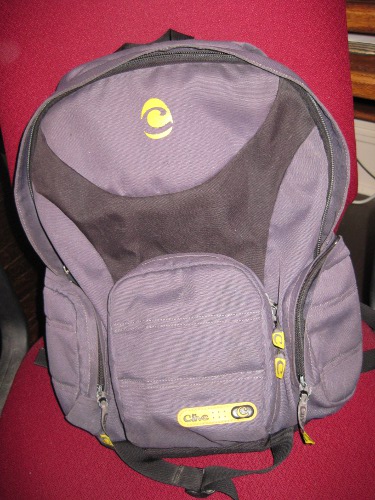
I’ve always had a thing for high quality, high utility bags, so when my beloved old Clive Front backpack finally started to fall apart, I was pretty unhappy about it. Since Eagle Creek (the former parent/sister company of Clive) re-absorbed Clive and subsequently killed the line (and purged most references to Clive from their website), I was preparing to write it off as dead. I sent an email to their service department asking if they would still service the bag (Clive bags came with an absolutely amazing lifetime warranty) anyway, and they proved they are a class act by informing me that it was indeed still covered, and promptly producing an RMA number. It took a couple weeks for it to come back, but it has returned with a new bottom panel neatly sewn in.
That bag has been in near continuous use since my sophomore year of high school, and until this round had only needed service once when the zipper toggles snapped. It is a hell of a bag.

I’m still irritated by the death of the Clive line. Some of their later products were pretty uninspired hipster junk, but a quick trip through the wayback machine to Clive’s old skateboard backpack line (The only kind of skating I ever do is longboarding, and no one in their right mind is going to try to strap a 34” deck to a backpack, but they were their best bags anyway) shows what good backpack design looks like.

Posted in Objects, OldBlog | Tagged , , , | 2 Comments

Very Short Introductions

I learned about Oxford Press’ “A Very Short Introduction” series from Dr. Goldsmith during CGS500 last semester. Think of them as cliffs notes for reality; little 100-150 page volumes on a wide assortment of topics, written as an introduction to the topic by an expert. The only problem is they are rather expensive at around $9 a pop, and I’m not the only one I’ve heard look at the list and realize they want pretty much the whole set (around 200 at the moment). This is where the Internet kicks in. The Internet always brings me such great things. I’m not linking to it from here (that would be illegal…) but the usual places furnish a torrent of 85 volumes, a torrent of a partly overlapped 32 volumes, and some individual volumes that add up to about half the series. I’m still missing a few that I would like, especially “Intelligence”, “Sociology”, and a few individual philosophies/religions… hopefully the power of the interwebs will come though on that. I find this arrangement pretty ideal; to me PDFs are of comparable value to physical copies. On one hand; they don’t contribute to “stuff” (physical possessions to which I am attached), which I’m generally opposed to, and I can pack them onto the n810 and literally have a library in my pocket. On the other hand, reading extensively from screens isn’t at all good for the eyes, and isn’t quite as versatile as dead trees. This kind of thing almost makes me want one of the various “e-paper” reader appliances… its a shame they’re so damn expensive and limited (reading about them a while ago, the iRex iLiad looks like the winner of the bunch at the moment, but is even more expensive than the more common Kindle and Sony Readers). A full set of these on a connected eBook reader comes surprisingly close to the dream.

The books are incredibly, incredibly dense; I’ve been working on the Maquis de Sade one for two evenings now, and I’ve made it through about 50 pages of actual text. This is really, really unusual; for a reference point, when I gave in on the “You can’t criticize it until you give it a [serious|better|honest|another] try” argument (an argument I hate for all things) on the Harry Potter series, the whole series took me about 8 hours (for the record, my opinion of it didn’t really improve). This, however is EXCELLENT by every metric. It is thorough, well written, and intensely thought provoking; part of why it takes so long is that I’ve had to stop to evaluate my own beliefs on various topics. Some interesting things I have had to clarify to myself:
* I’m a materialist (no non-physical “self”) who believes in free will, or at least higher order effects which are indistinguishable from it. This is apparently an unusual combination.
* I don’t believe it’s reasonable to model humans as rational actors. That is the degree to which we are, mostly unconsciously, influenced by objectively irrelevant circumstance leads me to believe that, on average, for any given decision by any one individual, the decision is not made by a rational process. Dr. Pushkarskaya’s talk on biases in decision making in CGS500 provided concrete evidence for that assertion. I also prefer to imagine people are simply irrational, rather than immensely shortsighted and/or incredibly stupid.
* I tend to evaluate things based on net misery (or, conversely net happiness), which is an odd sort of Buddhist-tinged humanism. Net means net, the discussion of the conventional wisdom about removing bandages in this TED talk gets into that nuance pretty well.
* Based on the metric above, I DO believe that humanity is, on the whole, progressing, as a direct result of cultural, social, and technological development.

Thinking about this sort of thing makes me want even more to some group reading this summer with friends, there are SO MANY things I want to get to there should be plenty of opportunities. I think I might pass around (post?) my current list and go with whatever others want to read from it.

Posted in General, Literature, Objects, OldBlog | Leave a comment

Work Gloves

How did I ever get anything done without them?
workgloves_sm.jpg
At the recommendation of a friend I got some machinist-style work gloves (these) for working on my CNC Mill project (which is coming along rather nicely); I don’t know how I ever accomplished anything without them. They allow you to use your hands with incredible abandon — accidentally clipped your finger with a file? no problem. Tapped yourself with a spinning dremel bit? no problem. Grabbed a razor-sharp freshly cut metal edge? no problem. They also allow you to maintain grip irregardless of what may be on your hands, both from the cutting oils and slippery bits perspective and from the tiny sharp metal fragments perspective. There are even nice little pads on the tips of the fingers to make the important areas grippier.
Then there’s my favorite feature; the knuckle guards. This style of glove is typified by rubber splines over the backs of the knuckles, which absorb and spread out any impacts, so when your hand slips while tightening something, there is no cursing and bleeding. The splines do however make one feel compelled to punch at things, just because you know you can.

Posted in DIY, General, Objects, OldBlog | Leave a comment