Article note: I knew several weird things about the Alpha bringup process, I was aware that initial ROM was loaded into the cache and executed there... but I didn't realize (1) the mode select is accomplished by selecting which 1 of the 8 bits from a byte parallel ROM is loaded (which is delightfully straightforward) and (2) the data is stored as complete already-tagged cache lines in a psychotic interleaved format.
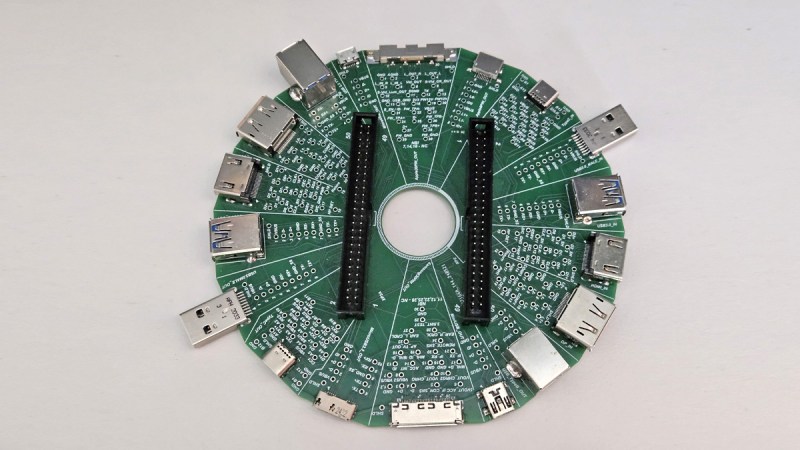
We’re used to there being an array of high-end microprocessor architectures, and it’s likely that many of us will have sat in front of machines running x86, ARM, or even PowerPC processors. There are other players past and present you may be familiar with, for example SPARC, RISC-V, or MIPS. Back in the 1990s there was another, now long gone but at the time the most powerful of them all, of course we’re speaking of DEC’s Alpha architecture. [JP] has a mid-90s AlphaStation that doesn’t work, and as part of debugging it we’re treated to a description of its unusual boot procedure.
Conventionally, an x86 PC has a ROM at a particular place in its address range, and when it starts, it executes from the start of that range. The Alpha is a little different, on start-up it needs some code from a ROM which configures it and sets up its address space. This is applied as a 1-bit serial stream, and like many things DEC, it’s a little unusual. This code lives in a conventional ROM chip with 8 data lines, and each of those lines contains a separate program selectable by a jumper. It’s a handy way of providing a set of diagnostics at the lowest level, but even with that discovery the weirdness isn’t quite over. We’re treated to a run-down of DEC Alpha code encoding, and should you have one of these machines, there’s all the code you need.
The Alpha was so special in the 1990s because with 64-bit and retargetable microcode in its architecture it was significantly faster than its competitors. From memory it could be had with DEC Tru64 UNIX, Microsoft Windows NT, or VMS, and with the last of which it was the upgrade path for VAX minicomputers. It faded away in the takeover by Compaq and subsequently HP, and we are probably the poorer for it. We look forward to seeing more about this particular workstation, should it come back to life.
Article note: This is interesting and a little surprising.
Tariff/U.S. policy dodge? Controlled opposition? Expense sharing on infrastructure? Testing the waters for a realignment where Intel spins out fabs?
Article note: I really enjoy experiencing transitional machines; this is exactly the same kind of dumb quest as my Thinkpad 560E that runs OpenStep, but one adaptation down the line.
AI Slop
I am not a cool person.
I don’t get invited to all the cool people events.
I never get to bask in the glory of FOMO Apple glory.
It’ll be 20 years ago the rumors were insane that Apple was going to dump the beloved PowerPC for intel. Darwin (the open-source core to OS X) was publicly available on Intel processors, and the scene was set for one of the most exciting transitions of the time:
The WWDC 2005 announcement
At the 2005 WWDC the bomb was dropped.
The star of the show, of course is that the entire OS X 10.4 Tiger demo was on the intel machine, and for a low price of being invited, belonging to the club & $999 USD you too could be part of the next big FOMO.
So as the big reveal went, not only was OS X on intel now a thing, it “secretly” was always a thing, and had always been the escape hatch from being locked in. And it’s no surprise, it saved NeXT as the i386 “white box” was the cheapest and fastest NeXT ever, just as further transitions to 64 bit then ARM64 would necessitate.
So how does one reasonably acquire one of these mythical beasts, 20 years after the fact? Well basically unless you are a cool kid in the know, you don’t.
however as mentioned in a few places the ATK was quickly out together with standard parts. And if this sounds like the genesis of the IBM 5150 PC, you’d be right! The star of the show is the late SSE3 enabled Pentium 4 processors and the Intel 915 chipset with onboard GMA 900 video.
Thankfully intel sold these parts to whomever basically wanted them, so they were sold on a bunch of partner boards, OEM, and even Intel fabricated boards. It may be my fault as typical board/processor/ram setups can be had for £5 in the UK, the magical 915 chipset has jumped these well north of £100. However, from my searching there are a few OEM systems with the needed chips, and that is the Dell Dimension 3100.
She’s ugly, but she works!
Now I know I got lucky as I got mine for £0.99 + £9 shipping! A huge shout out to my patreons for financing stuff like this! The unit was shown in pictures absolutely filthy, missing an optical drive and “untested”. We all know that it’s code for it was tested, it didn’t work, and it wasn’t worth their time to clean up and fix.
Opening the system up, revealed an ancient mechanical SATA disk, a bunch of dust bunnies, and empty memory sockets where the ram should go. Since I had purchased 7 other boards over the last 2 years (yes! Really! 7!!!), I have ample spare ram, gave it 2x512MB sticks, a new cr2032 CMOS battery, and the hard disk failed to spin or detect, but the machine powered up, did the POST test with no issues! I’ve got to say I was super happy so far! I have a £6 SSD I picked up from CeX, so I placed that into the machine, and now for the OS install.
My first choice was to create a Linux bootable USB stick and just copy the deadmoo image to the SSD. Of course, this came with the caveat that the disk is in the VMDK format which needed to convert using Qemu’s qemu-img utility to a raw disk image, then to compress it with gzip, as the Ubuntu install image seems to only understand gzip. I guess the next pro move is to see about a static standalone iSCSI target, or maybe even rsync? I think there is even Qemu network disk protocols by now, so it may be a way to get around the lack of optical media…? Anyways!
The deadmoo image can be decompressed and copied to the hard disk easily! It’s about 2gb compressed and 6GB uncompressed. A reboot, and we’re quickly and semi glitched in as Curtis to their desktop!
there is a pre-installed driver causing issues which drops us back to the fallback SVGA buffer, and I’m happy to report that the artificing you see under emulation is also present on physical hardware. Delete the TPM driver AppleTPMACPI.kext (the root password is ‘bovinity’), and reboot again. This time there won’t be any further glitches in the video, but there is another change to make, the core graphics needs to be replaced with the SSE3 variant so that after yet another reboot again Rosetta is fully working, giving us access to PowerPC applications (that don’t require Altivec! That wouldn’t arrive until 10.4.4 just in time for the public release!). This lets the screen savers run, and important applications like iTunes and Internet Explorer 5 for Max OS X.
As Steve had demo’d it’s pretty amazing at how much just works. You can really get an appreciation at just how truly portable C is, and how LIBC is the real cross platform winner is. The company behind Rosetta transitive, had a bright future ahead of them as you can’t get a better public endorsement that Steve Jobs at a WWDC! SGi had licensed them for Itanium IRIX, and if the other Unix vendors didn’t partner there was also a Linux path. Honestly, I’m surprised SUN didn’t buy them and do the same thing as Apple and jettison the SPARC, as they can sell a LOT more 1u servers, desktops and laptops than giant E10ks, but IBM equally scared and trapped on their AIX / UnixWare Itanium merge Monterey that sold like 5 units, instead bought the company and quickly disappeared the technology.
What a shame for the industry, but x86_64 still is an unstoppable force. Well at least until someone seriously challenges them.
Getting back to OS X, this is meant for developers, and the deadmoo image has X code installed, although I prefer to use the cli tools. This is a weird time in history as many things may support OS X, but they make really bad platform assumptions, and force endian directions breaking the given stance of all OS X is big endian – even though Intel Darwin has been around the entire time.
Ive had good luck with stuff that is much later than vintage 2005, as I’m lazy and it’s 2025. The fun stuff id built were:
SDL 1.15
DOSBox SVN
Qemu 0.10
Classic Cube
ssystem-1.6
I had thought that the performance using GCC 3 would be better than GCC 4 for Qemu, but after a lot of work I’d benched it with DooM v1.1 that V4 is faster.
Ssystem-1.6
Compatibility with OpenGL games is atrocious, but I’m pretty sure by the time 10.4.4 went public compatibility was better, although I doubt contemporary machines did all that well as there is a reason there was a rush to get intel versions out.
Building your own:
Intel 915G/915GV/910GL PCI Accelerated SVGA BIOS
The primary ingredient here is a board with the Intel 910/915 Graphics chips, which limits us to the late Intel Pentium 4 boards, with that terrible integrated video. It’s not the best video chipset in the world, but the only one that 10.4.1 had 3d acceleration for.
Apple Development Platform ADP 2,1
I had found out that the Dell 3100 pre-built tower has the supported chipset & CPU, however it doesn’t have the correct onboard network card.
Intel Desktop Board D915PSY
The Intel LAN boards of the era with the 915 moniker & Pentium 4 should be fine enough.
I don’t know why they are so expensive either.
Although in the recent years these boards have gotten rather expensive. I can’t imagine why, as they absolutely suck for retro gaming as you’d 100% use a GPU, Other than 10.4.1 I can’t imagine why anyone would want a P4/915 combo.
While you could dd a deadmoo image onto 2 disks, then play partition games, it’s far easier to use the converted ISO with 10.4.1 to just boot up and install if that is an option.
If you don’t have a 910/915 based board, you can run this under emulation well enough. The weird graphical glitches you’ll experience are present on real hardware as well.
While not terribly useful, it is an interesting glimpse as at least x86 is available to the masses.
Article note: It's a surprisingly deep question, there are many answers, and almost all of them are sad.
The whole Brook/CTM/Stream generation (which largely predates CUDA) basically getting memory-holed means they lost an entire generation of development and momentum.
OpenCL being a legitimate standard but an ergonomic nightmare stole some more momentum.
Their hardware support being spotty and poorly documented is a serious source of discouragement.
CUDA already having ecosystem effects (and not having a standard) means making compatible stuff will always be behind and take a performance penalty.
Article note: There are so many suspicious things about this it's hard to pick which is greasiest.
Is he trying to suck data without legal protections? Hide some debts? Inflate a valuation? Streamline chatterbot-propaganda-for-hire?
A few years after buying Twitter for $44 billion, Elon Musk announced that his AI business xAI has acquired the social media platform X, formerly known as Twitter. In a tweet, he described it as an all-stock transaction, valuing xAI at $80 billion and X at $33 billion, including $12 billion in debt it had as part of his takeover. “This combination will unlock immense potential by blending xAI’s advanced AI capability and expertise with X’s massive reach,” writes Musk.
In response to a deal cementing about $11 billion in lost value since the 2022 sale, X CEO Linda Yaccarino posted, “The future could not be brighter.”
Despite failing so far to make X an “everything app,” Musk has tied these two ventures together closely since launching xAI in the summer of 2023, saying that access to the vast trove of data from Twitter / X would give it a major advantage, and prominently placing xAI’s Grok tool within the social app. This week, Grok launched an integration beyond X, joining Telegram.
The arrangement is also a reminder of a previous Musk deal combining two companies he controlled. Tesla Motors acquired SolarCity, a company with Musk as its largest individual shareholder and his cousin Lyndon Rive as CEO, for $2.6 billion in 2016 and dropped “Motors” from its name. Musk didn’t mention Tesla in the announcement, after already proclaiming “I have, like, 17 jobs” at a hastily-announced all-hands meeting for the car company last week — it’s unclear if this deal adds to or subtracts from the number.
Today’s tweet also didn’t mention his ambition for the service to handle “someone’s entire financial life,” but it does repeat his claim of X as “the digital town square.”As we noted in January, xAI staffers were also X employees, with company laptops and access to its code base. Musk had also previously claimed X investors would own 25 percent of XAI, but as of January, that had not materialized for X employees with shares in the company.
While X’s valuation had reportedly dropped since the 2022 takeover before recently rebounding, the value of xAI has risen along with other companies in the space like Nvidia and OpenAI, where Musk has gone from co-founder and early investor to rival and legal antagonist since walking away in 2018.The Wall Street Journalreported xAI had been valued at $50 billion in an investment round last November, more than double its $24 billion valuation during another funding round in the spring of 2024.
@xAI has acquired @X in an all-stock transaction. The combination values xAI at $80 billion and X at $33 billion ($45B less $12B debt).
Since its founding two years ago, xAI has rapidly become one of the leading AI labs in the world, building models and data centers at unprecedented speed and scale.
X is the digital town square where more than 600M active users go to find the real-time source of ground truth and, in the last two years, has been transformed into one of the most efficient companies in the world, positioning it to deliver scalable future growth.
xAI and X’s futures are intertwined. Today, we officially take the step to combine the data, models, compute, distribution and talent. This combination will unlock immense potential by blending xAI’s advanced AI capability and expertise with X’s massive reach. The combined company will deliver smarter, more meaningful experiences to billions of people while staying true to our core mission of seeking truth and advancing knowledge. This will allow us to build a platform that doesn’t just reflect the world but actively accelerates human progress.
I would like to recognize the hardcore dedication of everyone at xAI and X that has brought us to this point. This is just the beginning.
Thank you for your continued partnership and support.
Article note: I don't dislike SDDM, was glad when the KDE folks adopted it, and think the trend of login managers getting ever more tightly coupled to specific DEs is unfortunate (and yet another sign that wayland is the wrong set of abstractions), but also see the appeal of a much better-integrated login manager/locker.
KDE’s login manager, SDDM, has its share of problems, and as such, a number of KDE developers are working on replacement to fix many of these long-standing issues. So, what exactly is wrong with SDDM as it exists today?
With SDDM, power management is reinvented from scratch with bespoke configuration. We can’t integrate with Plasma’s network management, power management, volume controls, or brightness controls without reinventing them in the desktop-agnostic backend.
SDDM was already having to duplicate too much functionality we have in KDE, which was very frustrating when we’re left maintaining it.
On top of that, theming is also a big issue with SDDM, as it doesn’t adopt any of the existing Plasma themes, wallpapers, and so on, forcing users to manually makes thse changes for SDDM, and forcing theme developers to make custom themes just for SDDM instead of it just adopting Plasma’s settings. The new login manager they’re working on will instead make use of existing Plasma components and be brought up like Plasma itself, too.
For now, the SDDM replacement is roughly at feature parity with SDDM, but it’s by no means ready for widespread adoption by distributions or users. Developers interested in trying it out can do so, though, and as it mostly looks like the existing default SDDM setup, you won’t even notice anything in day-to-day use.
Article note: - The volume is quite large (325 x 320 x 325), and it isn't outrageously expensive ($1900 or $2200 with AMS).
- The integrated laser and printer thing is a dumb trap several 3D printer manufacturers have fallen for over the years. The contamination from the laser makes the printer perform poorly, the work surface requirements are wildly divergent... combining them makes both worse. They should have known better. It's kind of a fun hobbyist hack, but a simple cheap laser cutter is a better use of resources ...and I don't have one at home because they are a stinky menace that I'm not set up to ventilate safely. I'm a little surprised they went for it on liability alone, dumb assess keep poisoning themselves with vinyl in glowforges.
- The new AMS2 Pro is the best thing in the announcement, it fixes the eroding inlets and hard to service feed path problems of the earlier model (by adding ceramic collars and excluding some dumb plastic parts), plus it has a really good ventilated active dryer design integrated.
- The dual-head design seems pretty good for the common case of switching between two materials. It's slightly unfortunate but a totally reasonable compromise that you can't feed both heads from the same AMS and it eats a bit of width out of the volume.
- There seem to be some incremental improvements to the basic formula of their earlier CoreXY designs, the aluminum cage looks more rigid, there's a properly constrained rail on x, and it looks like at least several axes are a real servo which is an interesting development in the "not outrageously expensive" market.
- The drag knife is marginally interesting; I have a Silhouette Cameo 4 that has been a lot of fun, and earlier had mediocre results strapping a graphtec blade to my CNC router. I think by using mats compatible with the bed mounting system they should be able to make that acceptable as long as it's cheap.
This thing isn't revolutionary, but as a printer it fixes holes in their existing offerings (and as a laser cutter it's a bad idea and they should feel bad).
Bambu Labs is launching a new multi-functional “personal manufacturing” machine that goes beyond 3D printing.
The new Bambu H2D is a dual nozzle 3D printer and laser cutter all in one. From some of their marketing images, you could also attach a marker for computer-controlled graphics. It looks like this is only included with the laser combo models.
Described as “a hard core laser machine,” the Bambu H2D can be equipped with a 10W or 40W laser, with the latter being capable of cutting up to 15mm (~0.59″) thick plywood.
The H2D features “laser-proof windows” and they’re also selling an optional air purifier separately.
Bambu says that the new machine features “revolutionary accuracy” with “a motion system that is 10 times more accurate.” This is said to “reduce the hassle of tweaking design and settings” for components that are to be assembled or printed together.
It also features “enhanced motion accuracy” and “special calibration for select Bambu Labs filaments” that are said to provide for “perfect fits with standard parts like steel shaft every time” with “no more tedious gap adjustments needed.”
In their marketing video, Bambu showed off different typical family members using the H2D to print, cut, or fabricate parts for personal projects, include a bicycle seat.
This was also an example of how the dual extruder printer can work with two materials simultaneously for functional parts or for part support scaffolding.
They then show off a 3D-printed bike helmet and quip that the dad shouldn’t go too fast because they haven’t figured out how to 3D print BandAids yet.
The new AMS (automatic material system) looks to have in filament dryer add-on.
Filament drying, dual nozzles, laser cutting, and more? Bambu says the new machine is “bigger, faster, better,” and that seems like an accurate claim.
I own one of their other machines, and it’s as near a plug-and-play machine as I’ve ever seen. The new model looks to expand upon it, with more filament feeding sensors – 15 instead of just 1 – and even more sophisticated AI checklists and visual monitoring via the built-in camera.
From the spec sheet, it has a live view camera, nozzle camera, birdseye camera, toolhead camera, door sensor, filament runout sensor, tangle sensor, filament odometry that’s supported with the AMS, and power loss recovery.
There’s a lot going on here.
Bambu hypes it up, saying the H2D delivers “industrial-grade accuracy.”
Bambu H2D Pricing
Bambu H2D – $1,899 Bambu H2D with AMS Combo – $2,199 Bambu H2D Laser Full Combo with AMS and 10W Laser – $2,799 Bambu H2D Laser Full Combo with AMS and 40W Laser – $3,499
The AMS allows you to load several spools of filament at once, which can then be selected for use via software controls.
It looks to me that Bambu made evolutionary improvements well above and beyond their previous flagship X1C 3D printer.
I’m not sure how I feel about 3D-printed bicycle saddles, but 3D-printed helmets? If they’re recommending you print your own bike helmets, how much attention was given to laser cutter safety outside of the “safety windows” that are found on the H2D Laser Edition models?
I couldn’t find much information about fume extraction or filtration for the laser cutter.
Bambu advertises that the laser modules can work on “wood, rubber, metal sheet, leather, dark acrylic, stone, and more.” A lot of materials – especially plastics – can release very toxic fumes when laser-cut.
They’re hyping this up to be a revolutionary “personal manufacturing hub,” but I have serious concerns about the laser safety.
Bambu machines are not known to be easily repairable. They had a recall not too long ago, and the affected heatbed cable wasn’t user replaceable. The only recourse was to return the entire machine or arrange for replacement of the heatbed and cable by a trained electronics repair technician.
Granted you can’t replace parts of your ink printer yourself, but personal and hobbyist 3D printers have traditionally had accessible hardware.
To their credit, I just checked Bambu’s Wiki and there’s clear and detailed documentation on how to replace certain parts. It seems they have made some progress in a short time.
When I purchased my 3D printer a year ago, I read numerous stories about Bambu’s support not being able to keep up with how many customers they had been gaining, leading to lower quality service. I haven’t had to test Bambu’s support yet, and they might have hired and trained more techs since then.
Bambu seems to be promoting the H2D as a 3D printer and laser cutter for everyone in the family, and I’m not convinced they’re ready for that yet.
Aside from how they show the new machine operating in the middle of a child’s bedroom with no mention of filtration or exhaust, I can’t get over the part about 3D printed helmets. That can’t be very protective, right? Stick with store-bought helmets that are certified to meet safety standards.
There’s a lot of hype, but also a lot of substance.
My biggest hesitations are centered around the safety of this machine, and of Bambu’s support quality. Pushing beyond 3D printing and fabrication hobbyists and into the average consumer territory is a big step. I’ll keep my wallet in my pocket for now.
There’s also the matter of how pricing starts close to $2000 and then balloons to $3500 if you want the full combo with their higher powered laser option.
I’ve been avoiding cheap laser cutters – even when offered to me for review consideration – because I have yet to find one I can trust to be safe. I’m not sure I’d trust Bambu just yet. We’ll see.